Hardware
Pinout
The following figure shows the Charge Control Y from a front view with numbered pinouts:
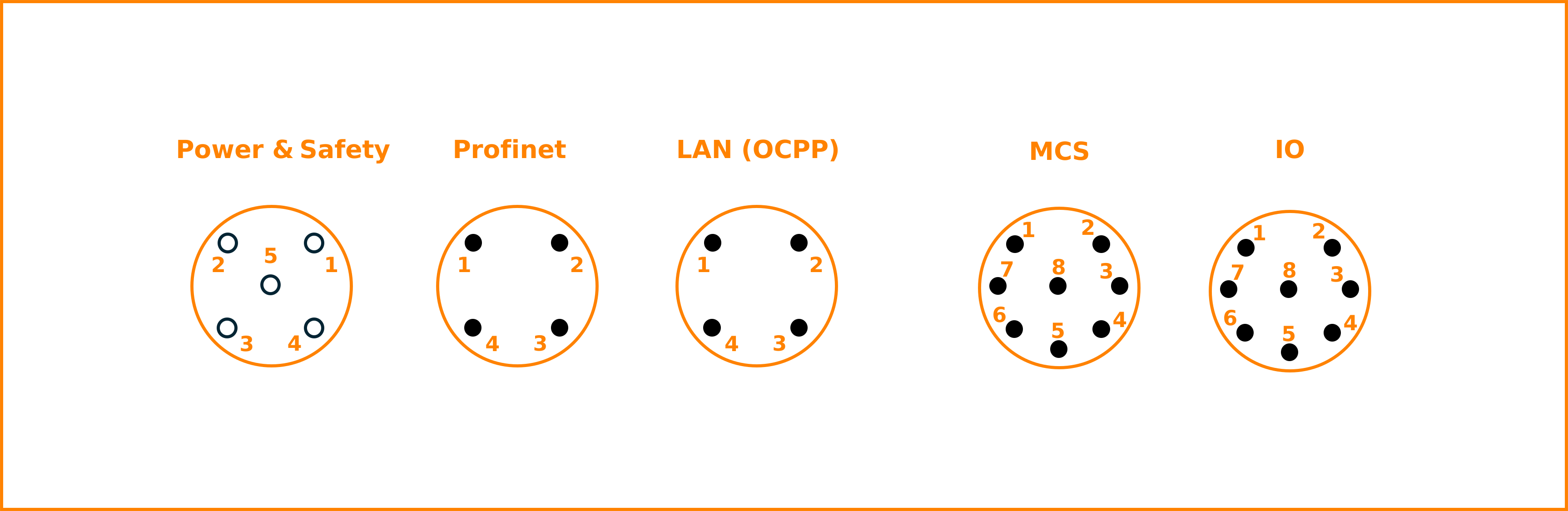
Fig. 8 Charge Control Y Pinout (Front View)
The following table lists the connector types on Charge Control Y side and a matching counterpart example cable.
Connector |
Pin Count |
Coding |
Gender |
Example Counterpart Part Number/Link |
|---|---|---|---|---|
Power & Safety |
5 |
A |
Male |
|
Profinet |
4 |
D |
Female |
|
LAN (OCPP) |
4 |
D |
Female |
|
MCS |
8 |
A |
Female |
|
IO |
8 |
A |
Female |
Power & Safety
Pin |
Signal |
|---|---|
1 |
24 V power supply |
2 |
24 V emergency in |
3 |
Ground (EVSE) |
4 |
HV Ready In |
5 |
HV Ready Out |
Shield |
Ground (EVSE) |
Profinet
The Profinet interface supports 10/100 Mbit/s Ethernet. In the Linux operating
system it is available as network interface eth2. The MAC address of this
interface is stored within the OTP of the System on Chip.
Pin |
Signal |
|---|---|
1 |
ETH1 TX P |
2 |
ETH1 RX P |
3 |
ETH1 TX N |
4 |
ETH1 RX N |
Shield |
Ground (EVSE) |
LAN (OCPP)
The LAN interface supports 10/100 Mbit/s Ethernet. In the Linux operating
system it is available as network interface eth0. The MAC address of this
interface is stored within the OTP of the System on Chip.
Pin |
Signal |
|---|---|
1 |
ETH2 TX P |
2 |
ETH2 RX P |
3 |
ETH2 TX N |
4 |
ETH2 RX N |
Shield |
Ground (EVSE) |
MCS
The MCS interface supports 10 Mbit/s Ethernet. In the Linux operating
system it is available as network interface eth1. The MAC address of
this host interface is stored within the EEPROM on the SOM.
Pin |
Signal |
|---|---|
1 |
10-Base T1S P |
2 |
10-Base T1S N |
3 |
Temp1 input |
4 |
Temp2 input |
5 |
Common ground for Temp1 and Temp2 |
6 |
Charge Enable (CE) |
7 |
Insertion Detection (ID) |
8 |
Ground (MCS) |
Shield |
Ground (MCS) |
IO
The CAN interface is a full implementation of the CAN FD protocol specification
version 2.0B. It is available on Linux network interface can0, which has a
default bitrate of 500 kBit/s.
Pin |
Signal |
|---|---|
1 |
CAN L |
2 |
CAN H |
3 |
Temp3 input |
4 |
Temp4 input |
5 |
Common ground for Temp3 and Temp4 |
6 |
Charge Enable (CE) |
7 |
Insertion Detection (ID) |
8 |
Ground (MCS) |
Shield |
Ground (MCS) |
Wiring Overview
PT1000 Temperature Sensors
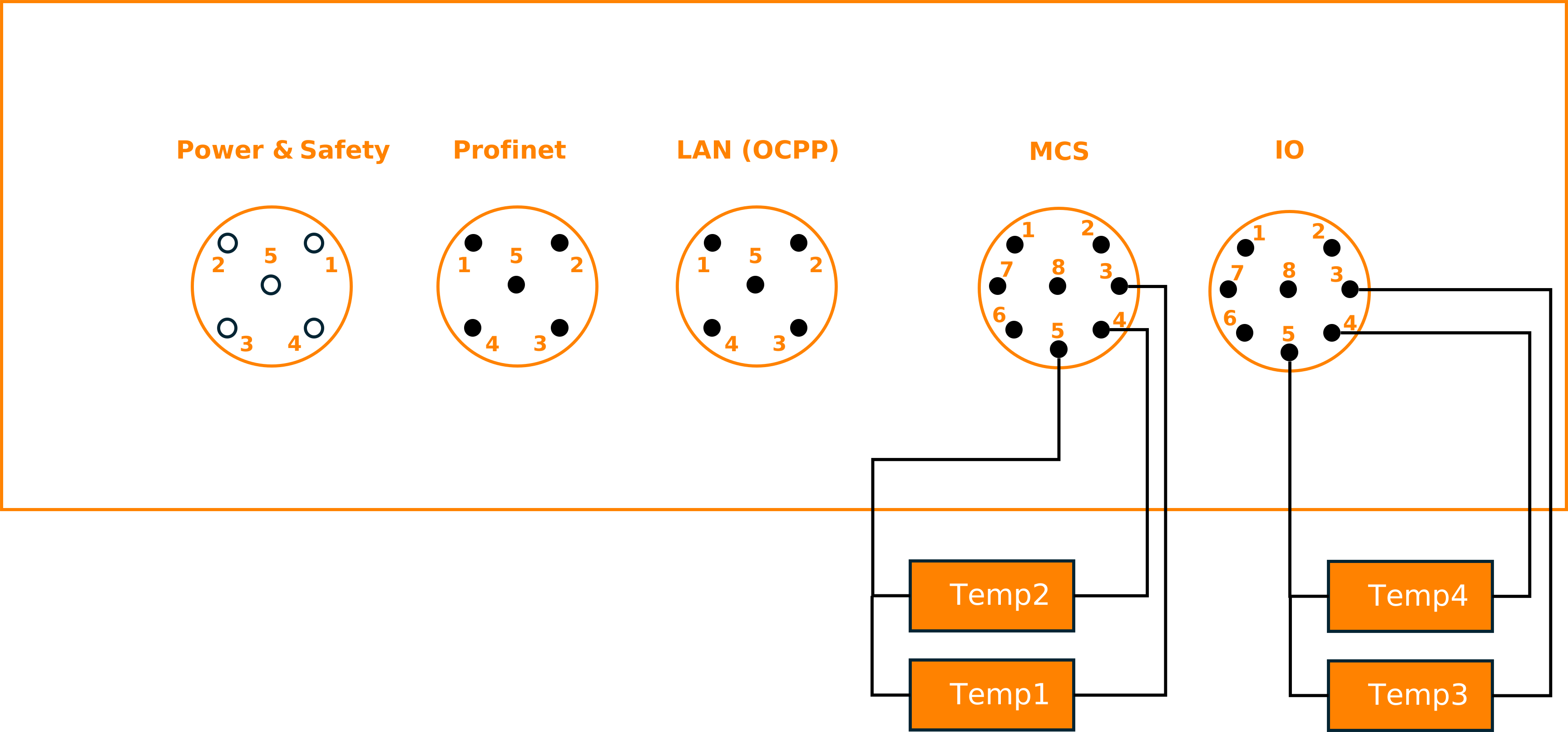
Fig. 9 Wiring overview for the PT1000 Temperature Sensors
This wiring diagram shows an overview of connecting the temperature sensors to the Charge Control Y:
Make sure you only connect PT1000 temperature sensors
Connect sensor 1 between Pin 3 and Pin 5 of MCS
Connect sensor 2 between Pin 4 and Pin 5 of MCS
Connect sensor 3 between Pin 3 and Pin 5 of IO
Connect sensor 4 between Pin 4 and Pin 5 of IO
Emergency Input
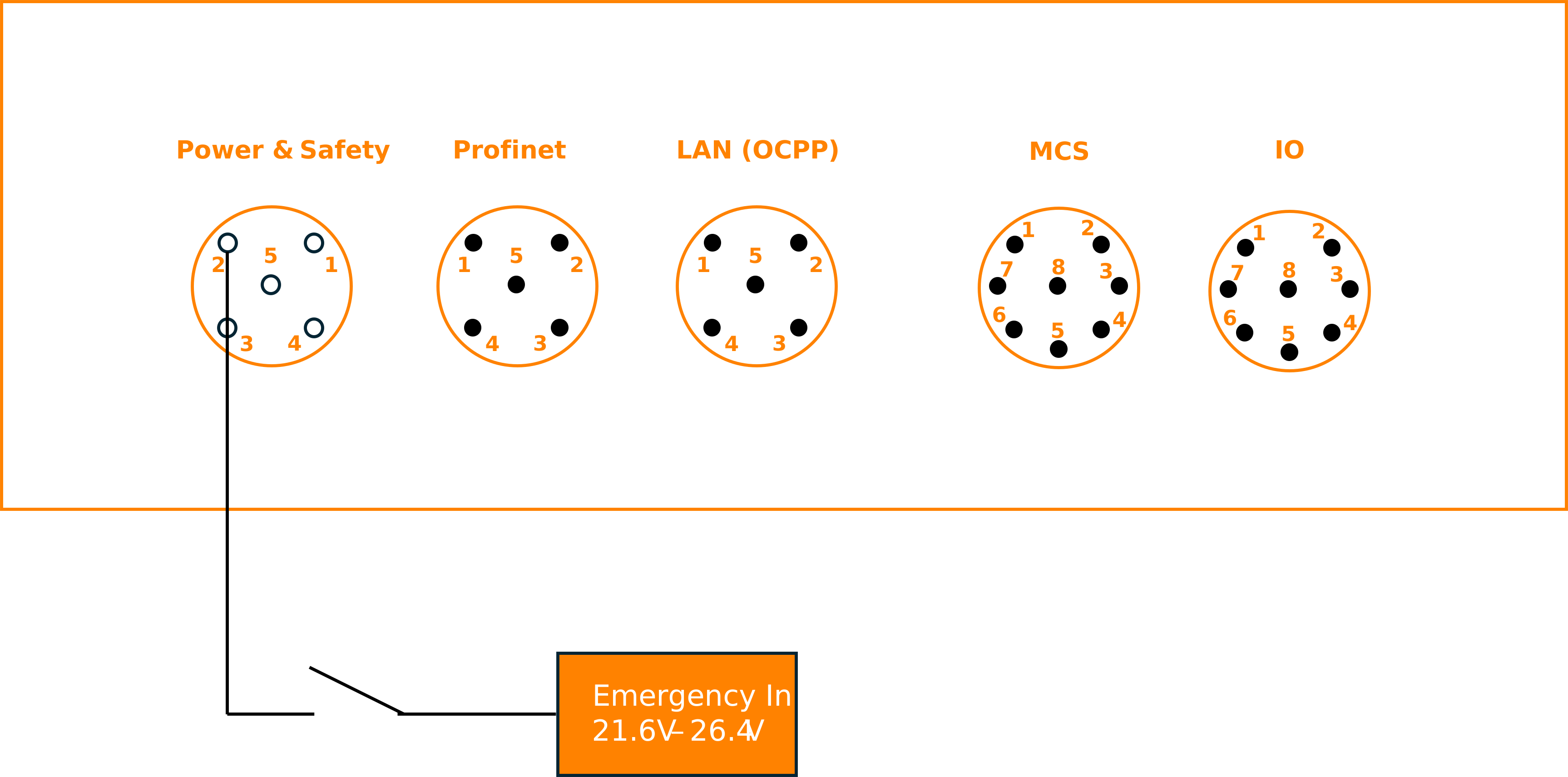
Fig. 10 Wiring overview for the Emergency Input
This wiring diagram shows an overview of connecting the emergeny input to the Charge Control Y:
make sure the emergency input stays between 21.6V and 26.4V for normal behavior
any other voltage is treated as error condition and triggers the safe state
the voltage is measured against Ground (EVSE) (Pin 3)
HV Ready
State C is indicated by internally switching HV Ready In (Pin 4, Power & Safety) to HV Ready Out (Pin 5, Power & Safety). The short between HV Ready In to HV Ready Out is only done while the vehicle indicates state C AND Charge Control Y detects no safety issues.