Safety Controller
Overview
The Charge Control Y is equipped with an additional MCU (aka Safety Controller) which is responsible for managing all low-level aspects which are critical for electrical safety. The firmware for this MCU is developed by chargebyte and is not open-source. The Charge Control Y is shiped with the safety controller firmware preinstalled.
The host controller firmware, e.g. the Linux system, communicates with the safety controller using an UART.
On Linux side, this is UART interface /dev/ttyLP2. The communication with the safety controller firmware
over this UART requires a proprietary protocol, see the following chapter. The required UART settings are listed
in the following table.
Setting |
Value |
|---|---|
Linux Interface |
/dev/ttyLP2 |
Baudrate |
115200 |
Databits |
8 |
Parity |
none |
Stopbits |
1 |
System Architecture
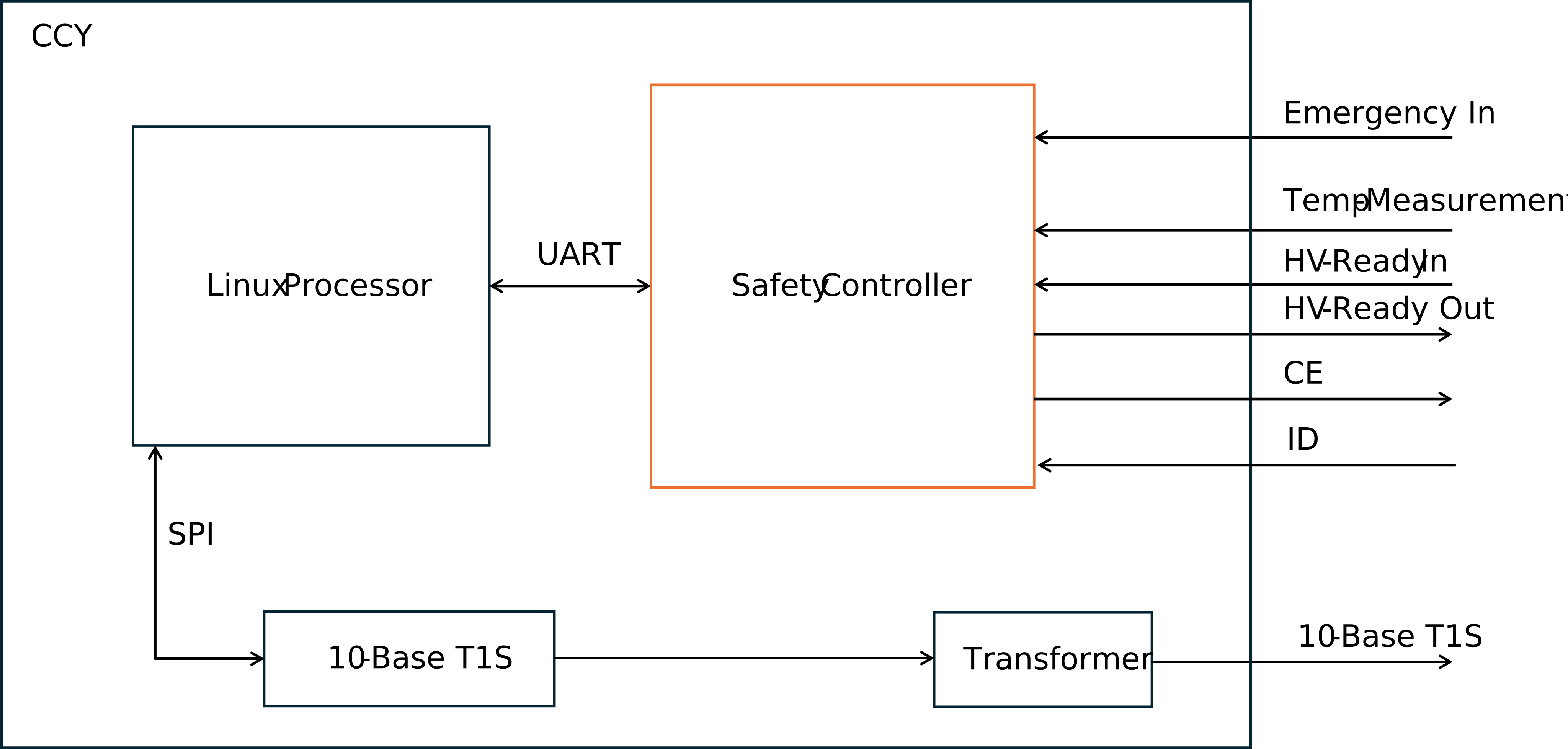
Fig. 11 Simplified System Architecture for the Safety Controller on the Charge Control Y
The safety controller manages the Charge Enable (CE) line, acting as a critical interface for monitoring Insertion Detection (ID) as well as Emergency Input and temperature sensors and therefore controlling the HV ready switch in accordance with EV safety standards. Its core function is to enforce safe operating states based on system diagnostics and environmental conditions.
Fault Detection & Safety Response
When an error is detected — such as a fault in the system, a triggered emergency input, or a thermal violation — the controller transitions to State EC, a fail-safe state that prevents further system operation to protect both the hardware and the user.
HV Ready Enablement
The controller verifies that no system errors are present and that the CE line is in State C. Only under these safe conditions it does enable the HV Ready signal, which may be used to energize the HV interlock or permit charging/operation.
Emergency Input
The input is active-low. This means an emergency stop needs to pull the input to Gnd (EVSE).
Temperature Monitoring
The simplified system architecture shows only one temperature input. In the real system, there are 4 independent temperature measurement circuits for PT1000 sensors. The safety software monitors the temperature circuit for hardware errors and for overtemperaure. The temperature threshold can be parameterized.
Reset Behaviour and Controller States
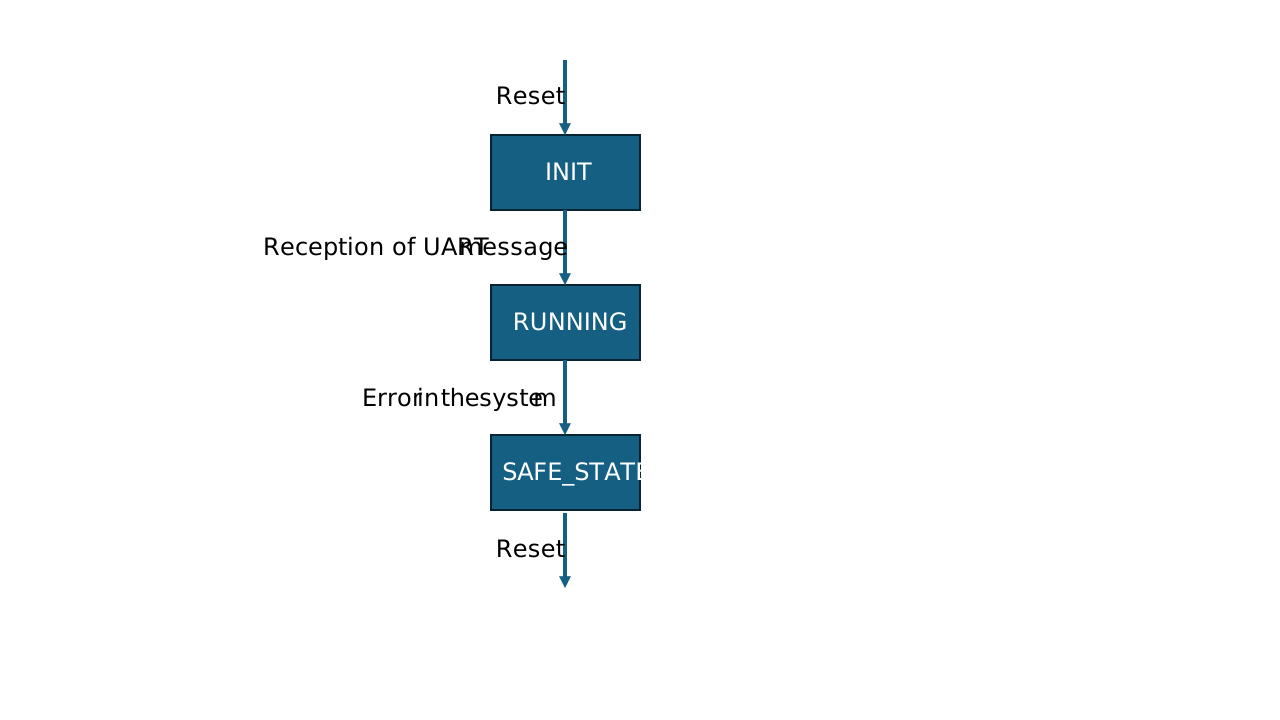
The safety controller starts in an initialization state, to give the peripherals time to reach a defined state. It leaves the initialization state to a running state, after the reception of the first UART message from the host. Only periodic messages leave the init state. With the reception of inquiry messages, the safety controller stays in initialization. This gives the option to fetch version information in the init state. In running state, it monitors the peripherals and sends out UART messages. If any error occurs, the system goes into safe state. This state can only be left by a reset.
Safety Controller Parameterization
Overview
The safety controller can or must be parameterized to a certain extent. For example, it is required to know which temperature channels are actually in use and at which temperature thresholds the charging process needs to be stopped to avoid injuries to users and/or prevent damage to the EVSE itself. It also supports an emergency input channel which can be disabled when not connected/required in the actual customer setup.
These safety controller parameters are stored as a binary parameter block, directly in the safety controller’s flash. When shipped from factory, there is a default parameter block installed which allows easy evaluation of the product, but is not intended for production usage in the field. Customers are encouraged to adjust the parameters to their requirements/needs during deployment of the board into an actual charger.
To adjust the parameters, some small command line tools are included in the shipped Linux firmware which allow to create/modify the parameters on the board itself. However, it is also possible to use these tools on a Linux host system (e.g. in a virtual machine) and then to transfer the created parameter block to each board and install it.
The mentioned tools are part of the ra-utils repository on Github.
To make the handling of parameters human-friendly, all parameters can be put together using a YAML text file.
version: 1
pt1000s:
  - abort-temperature: 75.0 °C
    resistance-offset: 0.85 Ω
  - abort-temperature: 85.0 °C
    resistance-offset: 1.042 Ω
  - 80.0 °C
  - disabled

contactors:
  - with-feedback-normally-open
  - disabled
  - disabled

estops:
  - active-low
  - disabled
  - disabled
Important
The YAML file is required to be encoded in UTF-8. While most parameters are ASCII only, temperature thresholds require trailing °C suffix which has a special UTF-8 encoding sequence. This might be displayed incorrectly in the editor when editing on the device itself and/or finally stored wrong in the YAML file. The same applies to the resistance offsets in Ohm. When unsure, adapt/create the YAML file on your Linux host system with your preferred editor and transfer it to the board via Ethernet network (e.g. SCP/SFTP).
Such a YAML file must be converted to a binary parameter block file afterwards. And this binary parameter block file must finally be flashed to the safety controller’s flash memory, see below.
Important
The YAML file allows to specify a numeric parameter block version. This version is used internally by the safety controller firmware to detect the binary structure of the parameter block. It must thus match the safety firmware’s expectation, otherwise the safety controller will refuse to work and enters safe state directly.
Temperature Channel (PT1000) Configuration
The safety controller supports up to 4 PT1000 temperature channels. Thus the YAML file expects for each channel a temperature threshold in °C at which the safety controller stops and/or prevents charging. Also for each channel, an offset value in Ohm can be specified. This offset depends on the actual physical wiring and must be determined in the specific customer setup. If a PT1000 channel is not wired/used, it is required to disable this channel using the special word disabled instead of a temperature value. The example YAML file above shows that the PT1000 configuration is an array with up to 4 items. Each item can either be a single temperature threshold, the special token disabled or it is a key-value list. Valid keys are abort-temperature and resistance-offset. If no resistance-offset is given, then it is assumed to be zero.
The accepted value range for abort-temperature is -80.0 °C to 200.0 °C and it is stored with one decimal digit.
The range for resistance-offset is -32.0 Ω … 32.0 Ω and these values are stored with three decimal digits internally.
Contactor and Contactor Feedback Configuration
On Charge Control Y, the high-voltage contactors are not controlled directly by the safety controller firmware. Please do not modify the shipped factory settings as there are board revision specific differences.
Emergency Input Configuration
The safety controller can monitor up to 3 emergency inputs, however on Charge Control Y only one physical emergency input is available. So the second and third inputs must kept disabled.
Possible configuration values for the first one are:
disabled
active-low
Installing a Parameter Block
Once the YAML file is created and fits your charger setup, it is required to convert it to a binary parameter block file. In the mentioned repository, there exists a tool ra-pb-create to generate such a binary file from the YAML file. The following session transcript shows how the install procedure works:
# create a YAML file on-the-fly
$ cat <<EOL > /tmp/my-parameters.yaml
version: 1
pt1000s:
  - abort-temperature: 75.0 °C
    resistance-offset: 0.85 Ω
  - abort-temperature: 85.0 °C
    resistance-offset: 1.042 Ω
  - 80.0 °C
  - disabled

contactors:
  - with-feedback-normally-open
  - disabled
  - disabled

estops:
  - active-low
  - disabled
  - disabled
EOL

# convert YAML to binary
ra-pb-create -i /tmp/my-parameters.yaml -o /tmp/my-parameters.bin

# stop EVerest - to have exclusive access to safety controller
systemctl stop everest

# flash the parameter block
ra-update -a data flash /tmp/my-parameters.bin

# restart EVerest
systemctl start everest
Checking the Installed Parameter Block
To check which settings are currently used by the safety controller firmware, it is possible to read back the parameter block.
systemctrl stop everest
ra-update -a data dump | ra-pb-dump
This will print the current settings in YAML format on stdout.
Safety Controller Communication Protocol
Packet Format Description
Data packet format
Data packets contain payload and can be sent out from host to safety controller or vice versa. Data packets from safety controller to host can be transmitted periodically or by request via an inquiry packet. Only one inquiry packet can be requested before requesting the next one.
Symbol |
Size |
Code |
Description |
|---|---|---|---|
SOF |
1 byte |
0xA5 |
Start of Frame |
ID |
1 byte |
Packet Identifier |
|
Data |
8 byte |
Payload |
|
CRC |
1 byte |
CRC Checksum |
|
EOF |
1 byte |
0x03 |
End of Frame |
Packet Identifier (ID)
The values of the packet identifier (PacketId) are mapped to the messages as summarized below.
PacketId |
Description |
Communication Dir. |
Periodicity |
Triggered by Inquiry |
|---|---|---|---|---|
0x11 |
Charge Control 2 |
Host → Safety |
periodically, every 100ms OR immediately if changes occur |
No |
0x10 |
Charge State 2 |
Safety → Host |
periodically, every 100ms |
No |
0x08 |
PT1000 State |
Safety → Host |
periodically, every 100ms |
No |
0x0A |
Firmware Version |
Safety → Host |
no, only upon request via inquiry packet |
Yes |
0x0B |
GIT Hash |
Safety → Host |
no, only upon request via inquiry packet |
Yes |
0xFF |
Inquiry Packet |
Host → Safety |
no, only to trigger inquiries |
No |
CRC Checksum Field
The checksum is defined over:
Width       = 8
Poly        = 0x1d
XorIn       = 0xff
ReflectIn   = False
XorOut      = 0xff
ReflectOut  = False
Algorithm   = table-driven
Name        = CRC8 SAE J1850
ChargeControl2
ID: 0x11 (17)
Length: 8 bytes
Description: N/A
Senders: CCY_HostController
Name |
Start |
Length |
ByteOrder |
Signed |
Factor |
Offset |
Unit |
Description |
|---|---|---|---|---|---|---|---|---|
CC_ControllerReset |
3 |
2 |
No |
1 |
0 |
No description available |
||
CC_CCSReady |
7 |
4 |
No |
1 |
0 |
No description available |
Value Descriptions
CC_CCSReady
0x0 = CCS_NotReady
0x1 = CCS_Ready
0x2 = CCS_EmergencyStop
Bitfield Layout
                     Bit

        7   6   5   4   3   2   1   0
      +---+---+---+---+---+---+---+---+
    0 |<-------------x|<-----x|   |   |
      +---+---+---+---+---+---+---+---+
                    |       +-- CC_ControllerReset
                    +-- CC_CCSReady
      +---+---+---+---+---+---+---+---+
    1 |   |   |   |   |   |   |   |   |
      +---+---+---+---+---+---+---+---+
B   2 |   |   |   |   |   |   |   |   |
y     +---+---+---+---+---+---+---+---+
t   3 |   |   |   |   |   |   |   |   |
e     +---+---+---+---+---+---+---+---+
    4 |   |   |   |   |   |   |   |   |
      +---+---+---+---+---+---+---+---+
    5 |   |   |   |   |   |   |   |   |
      +---+---+---+---+---+---+---+---+
    6 |   |   |   |   |   |   |   |   |
      +---+---+---+---+---+---+---+---+
    7 |   |   |   |   |   |   |   |   |
      +---+---+---+---+---+---+---+---+
ChargeState2
ID: 0x10 (16)
Length: 8 bytes
Description: N/A
Senders: Safety Controller
Name |
Start |
Length |
ByteOrder |
Signed |
Factor |
Offset |
Unit |
Description |
|---|---|---|---|---|---|---|---|---|
CS_ID_State |
3 |
4 |
No |
1 |
0 |
No description available |
||
CS_CE_State |
7 |
4 |
No |
1 |
0 |
No description available |
||
CS_EStop_Reason |
15 |
8 |
No |
1 |
0 |
No description available |
||
CS_SafeStateActive |
23 |
2 |
No |
1 |
0 |
This signal reports, if the controller is in safeState or not. |
Value Descriptions
CS_ID_State
0x0 = Unknown
0x1 = Not Connected
0x2 = Connected
0x3 = Invalid
CS_CE_State
0x0 = Unknown
0x1 = A
0x2 = B0
0x3 = B
0x4 = C
0x5 = E
0x6 = EC
0x7 = Invalid
CS_EStop_Reason
0x0 = NoStop
0x1 = InternalError
0x2 = ComTimeout
0x3 = Temp1_Malfunction
0x4 = Temp2_Malfunction
0x5 = Temp3_Malfunction
0x6 = Temp4_Malfunction
0x7 = Temp1_Overtemp
0x8 = Temp2_Overtemp
0x9 = Temp3_Overtemp
0xA = Temp4_Overtemp
0xB = ID_Malfunction
0xC = CE_Malfunction
0xD = HVReady_Malfunction
0xE = EmergencyInput
CS_SafeStateActive
0x0 = NormalState
0x1 = SafeState
0x3 = SNA
Bitfield Layout
                     Bit

        7   6   5   4   3   2   1   0
      +---+---+---+---+---+---+---+---+
    0 |<-------------x|<-------------x|
      +---+---+---+---+---+---+---+---+
                    |               +-- CS_ID_State
                    +-- CS_CE_State
      +---+---+---+---+---+---+---+---+
    1 |<-----------------------------x|
      +---+---+---+---+---+---+---+---+
                                    +-- CS_EStop_Reason
      +---+---+---+---+---+---+---+---+
B   2 |<-----x|   |   |   |   |   |   |
y     +---+---+---+---+---+---+---+---+
t           +-- CS_SafeStateActive
e     +---+---+---+---+---+---+---+---+
    3 |   |   |   |   |   |   |   |   |
      +---+---+---+---+---+---+---+---+
    4 |   |   |   |   |   |   |   |   |
      +---+---+---+---+---+---+---+---+
    5 |   |   |   |   |   |   |   |   |
      +---+---+---+---+---+---+---+---+
    6 |   |   |   |   |   |   |   |   |
      +---+---+---+---+---+---+---+---+
    7 |   |   |   |   |   |   |   |   |
      +---+---+---+---+---+---+---+---+
PT1000State
ID: 0x8 (8)
Length: 8 bytes
Description: This message shall be sent from safety controller to host processor for indicating the state of the connected temperature sensors
Senders: chargeSOM_SafetyController, Safety Controller
Name |
Start |
Length |
ByteOrder |
Signed |
Factor |
Offset |
Unit |
Description |
|---|---|---|---|---|---|---|---|---|
PT1_Temperature |
7 |
14 |
Big Endian |
Yes |
0.1 |
0 |
°C |
Current temperature of PT1000 channel in °C with one decimal digit. 0x1FFF stands for: temp sensor not used. |
PT1_ChargingStopped |
8 |
1 |
No |
1 |
0 |
Indicates whether this PT1000 channel prevents charging, multiple channel can signal the condition in parallel. |
||
PT1_SelftestFailed |
9 |
1 |
No |
1 |
0 |
Indicates whether this PT1000 channel is disturbed, multiple channel can signal the condition in parallel. |
||
PT2_Temperature |
23 |
14 |
Big Endian |
Yes |
0.1 |
0 |
°C |
Current temperature of PT1000 channel in °C with one decimal digit. 0x1FFF stands for: temp sensor not used. |
PT2_ChargingStopped |
24 |
1 |
No |
1 |
0 |
Indicates whether this PT1000 channel prevents charging, multiple channel can signal the condition in parallel. |
||
PT2_SelftestFailed |
25 |
1 |
No |
1 |
0 |
Indicates whether this PT1000 channel is disturbed, multiple channel can signal the condition in parallel. |
||
PT3_Temperature |
39 |
14 |
Big Endian |
Yes |
0.1 |
0 |
°C |
Current temperature of PT1000 channel in °C with one decimal digit. 0x1FFF stands for: temp sensor not used. |
PT3_ChargingStopped |
40 |
1 |
No |
1 |
0 |
Indicates whether this PT1000 channel prevents charging, multiple channel can signal the condition in parallel. |
||
PT3_SelftestFailed |
41 |
1 |
No |
1 |
0 |
Indicates whether this PT1000 channel is disturbed, multiple channel can signal the condition in parallel. |
||
PT4_Temperature |
55 |
14 |
Big Endian |
Yes |
0.1 |
0 |
°C |
Current temperature of PT1000 channel in °C with one decimal digit. 0x1FFF stands for: temp sensor not used. |
PT4_ChargingStopped |
56 |
1 |
No |
1 |
0 |
Indicates whether this PT1000 channel prevents charging, multiple channel can signal the condition in parallel. |
||
PT4_SelftestFailed |
57 |
1 |
No |
1 |
0 |
Indicates whether this PT1000 channel is disturbed, multiple channel can signal the condition in parallel. |
Value Descriptions
PT1_Temperature
0x1FFF = TempSensorNotUsed
PT2_Temperature
0x1FFF = TempSensorNotUsed
PT3_Temperature
0x1FFF = TempSensorNotUsed
PT4_Temperature
0x1FFF = TempSensorNotUsed
Bitfield Layout
                     Bit

        7   6   5   4   3   2   1   0
      +---+---+---+---+---+---+---+---+
    0 |<------------------------------|
      +---+---+---+---+---+---+---+---+
    1 |----------------------x|<-x|<-x|
      +---+---+---+---+---+---+---+---+
                            |   |   +-- PT1_ChargingStopped
                            |   +-- PT1_SelftestFailed
                            +-- PT1_Temperature
      +---+---+---+---+---+---+---+---+
    2 |<------------------------------|
      +---+---+---+---+---+---+---+---+
    3 |----------------------x|<-x|<-x|
      +---+---+---+---+---+---+---+---+
                            |   |   +-- PT2_ChargingStopped
B                           |   +-- PT2_SelftestFailed
y                           +-- PT2_Temperature
t     +---+---+---+---+---+---+---+---+
e   4 |<------------------------------|
      +---+---+---+---+---+---+---+---+
    5 |----------------------x|<-x|<-x|
      +---+---+---+---+---+---+---+---+
                            |   |   +-- PT3_ChargingStopped
                            |   +-- PT3_SelftestFailed
                            +-- PT3_Temperature
      +---+---+---+---+---+---+---+---+
    6 |<------------------------------|
      +---+---+---+---+---+---+---+---+
    7 |----------------------x|<-x|<-x|
      +---+---+---+---+---+---+---+---+
                            |   |   +-- PT4_ChargingStopped
                            |   +-- PT4_SelftestFailed
                            +-- PT4_Temperature
FirmwareVersion
ID: 0xA (10)
Length: 8 bytes
Description: This message provides information about the type and version of the flashed firmware
Senders: chargeSOM_SafetyController, Safety Controller
Name |
Start |
Length |
ByteOrder |
Signed |
Factor |
Offset |
Unit |
Description |
|---|---|---|---|---|---|---|---|---|
MajorVersion |
7 |
8 |
No |
1 |
0 |
Major version of the firmware |
||
MinorVersion |
15 |
8 |
No |
1 |
0 |
Minor version of the firmware |
||
BuildVersion |
23 |
8 |
No |
1 |
0 |
Build or patch version of the firmware |
||
PlatformType |
31 |
8 |
No |
1 |
0 |
This firmware can be used for several products with minor changes in the build process. The platform type describes the used platform |
||
ApplicationType |
39 |
8 |
No |
1 |
0 |
The type of firmware. See possible values below |
||
ParameterVersion |
47 |
16 |
Big Endian |
No |
1 |
0 |
Version of the parameter file |
Value Descriptions
PlatformType
0x81 = chargeSOM
0x82 = CCY
ApplicationType
0x3 = Firmware
0x4 = End Of Line
0x5 = Qualification
Bitfield Layout
                     Bit

        7   6   5   4   3   2   1   0
      +---+---+---+---+---+---+---+---+
    0 |<-----------------------------x|
      +---+---+---+---+---+---+---+---+
                                    +-- MajorVersion
      +---+---+---+---+---+---+---+---+
    1 |<-----------------------------x|
      +---+---+---+---+---+---+---+---+
                                    +-- MinorVersion
      +---+---+---+---+---+---+---+---+
    2 |<-----------------------------x|
      +---+---+---+---+---+---+---+---+
                                    +-- BuildVersion
B     +---+---+---+---+---+---+---+---+
y   3 |<-----------------------------x|
t     +---+---+---+---+---+---+---+---+
e                                   +-- PlatformType
      +---+---+---+---+---+---+---+---+
    4 |<-----------------------------x|
      +---+---+---+---+---+---+---+---+
                                    +-- ApplicationType
      +---+---+---+---+---+---+---+---+
    5 |<------------------------------|
      +---+---+---+---+---+---+---+---+
    6 |------------------------------x|
      +---+---+---+---+---+---+---+---+
                                    +-- ParameterVersion
      +---+---+---+---+---+---+---+---+
    7 |   |   |   |   |   |   |   |   |
      +---+---+---+---+---+---+---+---+
GitHash
ID: 0xB (11)
Length: 8 bytes
Description: This message provides information about the GIT hash, written in the firmware
Senders: chargeSOM_SafetyController, Safety Controller
Name |
Start |
Length |
ByteOrder |
Signed |
Factor |
Offset |
Unit |
Description |
|---|---|---|---|---|---|---|---|---|
HashSignal |
7 |
64 |
Big Endian |
No |
1 |
0 |
First 8 byte of the 160 bit (SHA-1) GIT hash |
Bitfield Layout
                     Bit

        7   6   5   4   3   2   1   0
      +---+---+---+---+---+---+---+---+
    0 |<------------------------------|
      +---+---+---+---+---+---+---+---+
    1 |-------------------------------|
      +---+---+---+---+---+---+---+---+
    2 |-------------------------------|
      +---+---+---+---+---+---+---+---+
B   3 |-------------------------------|
y     +---+---+---+---+---+---+---+---+
t   4 |-------------------------------|
e     +---+---+---+---+---+---+---+---+
    5 |-------------------------------|
      +---+---+---+---+---+---+---+---+
    6 |-------------------------------|
      +---+---+---+---+---+---+---+---+
    7 |------------------------------x|
      +---+---+---+---+---+---+---+---+
                                    +-- HashSignal
InquiryPacket
ID: 0xFF (255)
Length: 8 bytes
Description: This packet is used to request a special message from the safety controller
Senders: chargeSOM_HostController, CCY_HostController
Name |
Start |
Length |
ByteOrder |
Signed |
Factor |
Offset |
Unit |
Description |
|---|---|---|---|---|---|---|---|---|
PacketId |
7 |
8 |
No |
1 |
0 |
The ID, which message shall be requested. Supported values are described below. |
Value Descriptions
PacketId
0xA = FirmwareVersion
0xB = GitHash
Bitfield Layout
                     Bit

        7   6   5   4   3   2   1   0
      +---+---+---+---+---+---+---+---+
    0 |<-----------------------------x|
      +---+---+---+---+---+---+---+---+
                                    +-- PacketId
      +---+---+---+---+---+---+---+---+
    1 |   |   |   |   |   |   |   |   |
      +---+---+---+---+---+---+---+---+
B   2 |   |   |   |   |   |   |   |   |
y     +---+---+---+---+---+---+---+---+
t   3 |   |   |   |   |   |   |   |   |
e     +---+---+---+---+---+---+---+---+
    4 |   |   |   |   |   |   |   |   |
      +---+---+---+---+---+---+---+---+
    5 |   |   |   |   |   |   |   |   |
      +---+---+---+---+---+---+---+---+
    6 |   |   |   |   |   |   |   |   |
      +---+---+---+---+---+---+---+---+
    7 |   |   |   |   |   |   |   |   |
      +---+---+---+---+---+---+---+---+
EVerest Board Support Package Module
chargebyte developed a comprehensive hardware abstraction module (HAL, or also called BSP module - board support package)
for EVerest charging stack to support the Charge Control Y. The module is called CbParsleyDriver and is
available in chargebyte’s public EVerest repository as open-source code:
https://github.com/chargebyte/everest-chargebyte/tree/main/modules/CbParsleyDriver
This module already implements the required communication protocol to interact with the safety controller.
All Charge Control Y boards ship with a Linux system preinstalled on eMMC, which also includes EVerest, the mentioned BSP module and example configuration files.