Hardware
Since the Charge SOM itself is a module which cannot be used without a carrier board, the following sections refer to the Charge SOM Evaluation Board as an example.
Wiring Overview
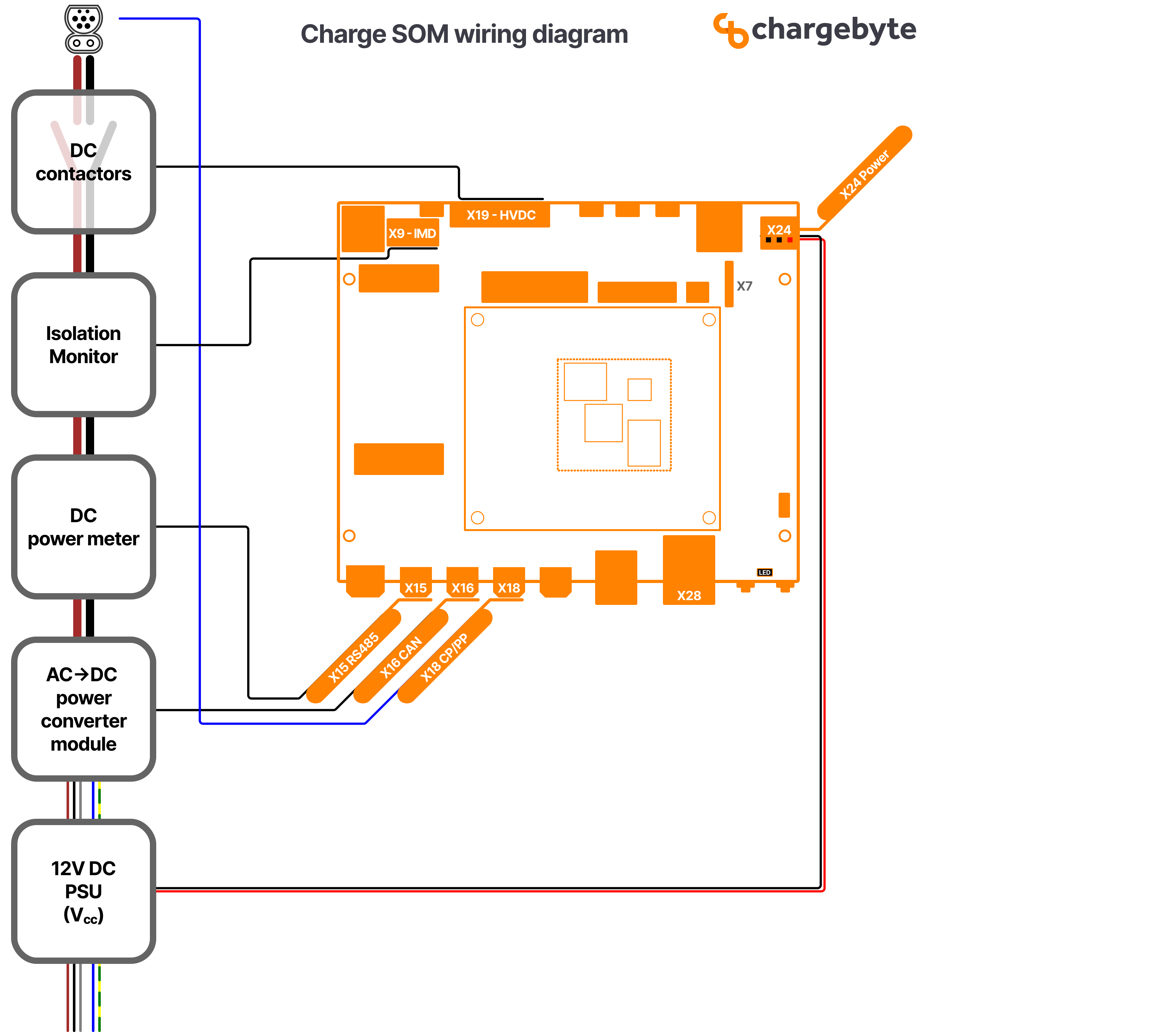
Fig. 6 Figure: Wiring Overview Diagram for Charge SOM EVB
This wiring diagram shows an overview of all components which are required at minimum to build a DC charging station:
A PSU as 12V DC supply for the Charge SOM EVB
A controllable power module (rectifier) for converting AC grid power into DC power to the EV. In this example, this power module is connected via CAN interface to the Charge SOM EVB which is a typical interface type for such devices.
A DC power meter for measuring the transferred energy. In this example, this electricity meter is connected via RS-485 bus and it is assumed that the meter supports the Modbus protocol. However, there exists also meters which use Ethernet and other protocols.
An insulation monitoring device (IMD). In the drawing, only the safety related connection is shown, that means that the output pin of the IMD (which switches on insulation faults) is wired to an input pin of the Charge SOM. The state of this input pin is observed by the onboard safety controller of the Charge SOM which ensures a safe state of the whole system in case of emergencies.
The high-voltage DC contactors for DC plus and minus rails.
High-Voltage Connector (HVDC, X19)
The X19 connector provides signals to switch the high-voltage contactors, but also for the corresponding feedback signals to detect contactor welding.

Fig. 7 Figure: Recommended Contactor Wiring
Note
The precharge contactor might not be necessary in your setup.
Insulation Monitoring Device (IMD, X9 + X15)
The X9 connector and its pinout is designed to match the signals used by Bender’s ISOMETER® isoCHA425HV with AGH420-1/AGH421-1.
In addition to the direct electrical wiring, the device has to be connected via RS-485 bus to provide the insulation resistance values which are required by EVerest’s IMD interface.

Fig. 8 Figure: Wiring for Bender’s IMD to Charge SOM EVB
Safety Controller
Overview
The Charge SOM platform is equipped with an additional MCU (aka Safety Controller) which is responsible for managing all low-level aspects which are critical for electrical safety. The firmware for this MCU is developed by chargebyte and is not open-source. The Charge SOM boards ship with the safety controller firmware preinstalled.
The host controller firmware, e.g. the Linux system, communicates with the safety controller using an UART.
On Linux side, this is UART interface /dev/ttyLP2. The communication with the safety controller firmware
over this UART requires a proprietary protocol, see the following chapter. The required UART settings are listed
in the following table.
Setting |
Value |
|---|---|
Linux Interface |
/dev/ttyLP2 |
Baudrate |
115200 |
Databits |
8 |
Parity |
none |
Stopbits |
1 |
System Architecture
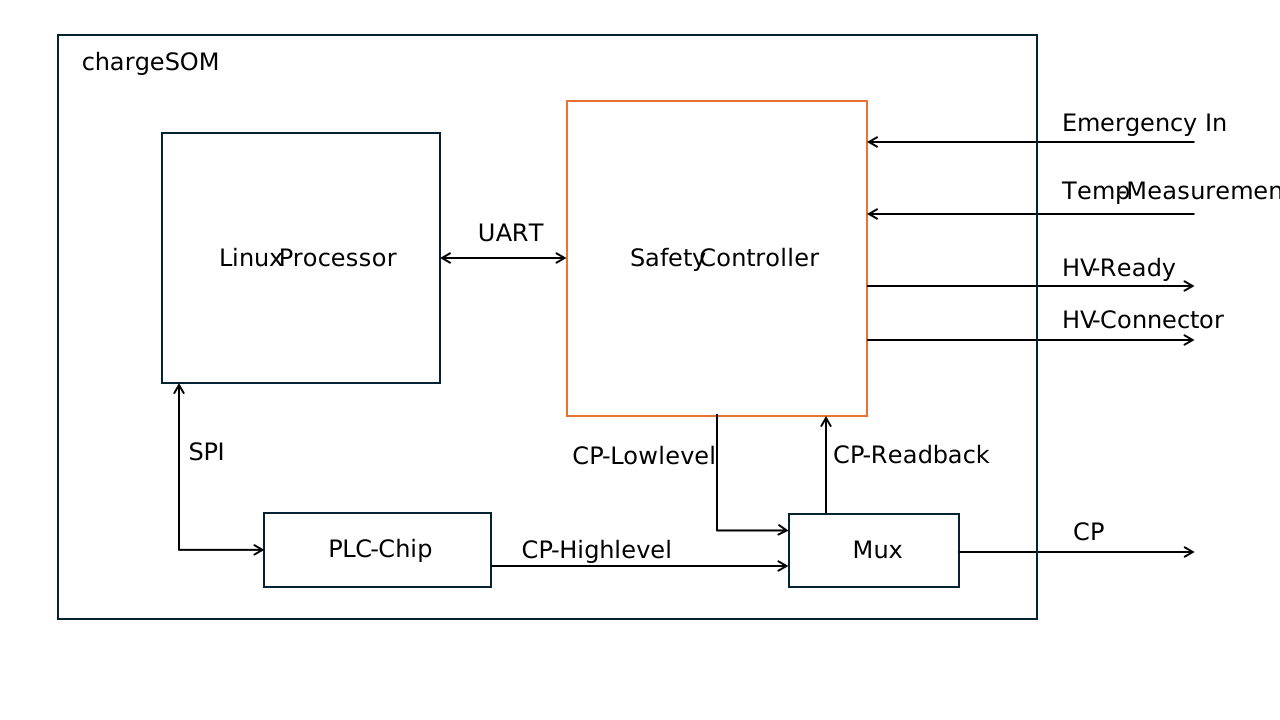
Fig. 9 Figure: Simplified system architecture for the safety controller on the chargeSOM
The safety controller manages the Control Pilot (CP) line, acting as a critical interface for monitoring and controlling the high-voltage (HV) system in accordance with EV safety standards. Its core function is to enforce safe operating states based on system diagnostics and environmental conditions.
Fault Detection & Safety Response
When an error is detected—such as a fault in the system, a triggered emergency input, or a thermal violation—the controller transitions to State F, a fail-safe state that prevents further system operation to protect both the hardware and the user.
HV Ready Enablement
The controller verifies that no system errors are present and that the CP line is in State C. Only under these safe conditions does it enable the HV Ready signal, which may be used to energize the HV interlock or permit charging/operation.
Emergency Inputs
The simplified system architecture shows only one emergency input. In the real system, there are 3 independent emergency input signals available: SAFETY_ESTOP1, SAFETY_ESTOP2 and SAFETY_ESTOP3. The inputs are active low. This means an emergency stop needs to pull the input to Gnd. The emergency inputs can be parameterized out.
Temperature Monitoring
The simplified system architecture shows only one temperature input. In the real system, there are 4 independent temperature measurement circuits for PT1000 sensors. The safety software monitors the temperature circuit for hardware errors and for overtemperaure. The temperature threshold can be parameterized.
HV Connector Control
If State C is confirmed and all safety criteria are met, the controller is also capable of closing HV connectors to complete the high-voltage path. Therefore it enables the 2 connectors SAFETY_HVSW1_HS and SAFETY_HVSW2_HS under the condition that State C is detected, the system is HV-ready and the host processor commands to close the contactors.
Reset Behaviour and Controller states
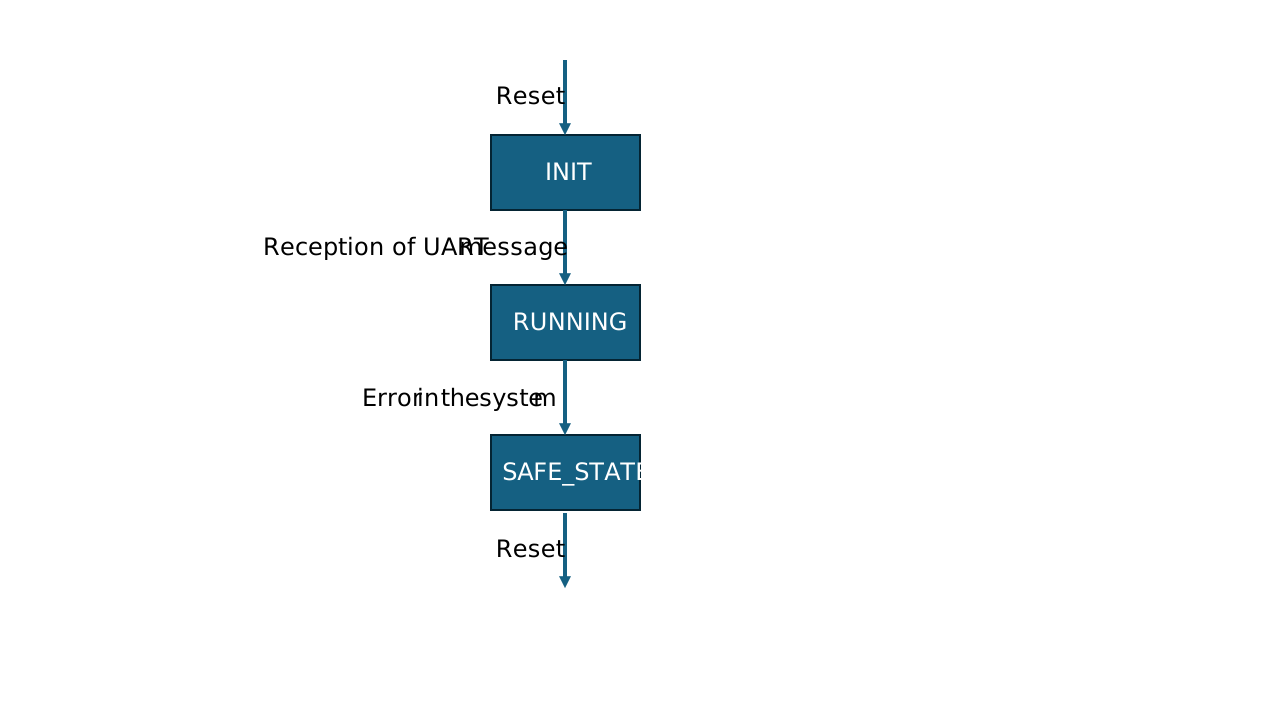
The safety controller starts in an initialization state, to give the peripherals time to reach an defined state. It leaves the initialization state to a running state, after the reception of the first UART message from the host. Only periodic messages leaves the init state. With the reception of inquiriy messages, the safety controller stays in initialization. This gives the option to fetch version information in an init state. In running state, it monitors the peripherals and sends out UART messages. If any error occurs, the system goes into safe state. This state can only be left by a reset.
Safety Controller Communication Protocol
Packet format descriptions
Data packet format
Data packets contain payload and can be sent out from host to safety controller or vice versa. Data packets from safety controller to host can be transmitted periodically or by request via an inquiry packet. Only one inquiry packet can be requested before requesting the next one.
Symbol |
Size |
Code |
Description |
|---|---|---|---|
SOF |
1 byte |
0xA5 |
Start of frame |
ID |
1 byte |
Packet Identifier |
|
Data |
8 byte |
Payload |
|
CRC |
1 byte |
CRC checksum |
|
EOF |
1 byte |
0x03 |
End of frame |
Packet Identifier (ID)
The values of the packet identifier (PacketId) are mapped to the messages as summarized below.
PacketId |
Description |
Communication Dir. |
Periodicity |
Triggered by Inquiry |
|---|---|---|---|---|
0x06 |
Charge Control |
Host → Safety |
periodically, every 100ms OR immediately if changes occur |
No |
0x07 |
Charge State |
Safety → Host |
periodically, every 100ms |
No |
0x08 |
PT1000 State |
Safety → Host |
periodically, every 100ms |
No |
0x0A |
Firmware Version |
Safety → Host |
no, only upon request via inquiry packet |
Yes |
0x0B |
GIT Hash |
Safety → Host |
no, only upon request via inquiry packet |
Yes |
0xFF |
Inquiry packet |
Host → Safety |
no, only to trigger inquiries |
No |
CRC checksum field
The checksum is defined over:
Width       = 8
Poly        = 0x1d
XorIn       = 0xff
ReflectIn   = False
XorOut      = 0xff
ReflectOut  = False
Algorithm   = table-driven
Name        = CRC8 SAE J1850
ChargeControl1
ID: 0x6 (6)
Length: 8 bytes
Description: This message shall be sent from the host processor to the safety controller to control the peripherals connected to the safety controller.
Senders: Default_HostController
Name |
Start |
Length |
ByteOrder |
Signed |
Factor |
Offset |
Unit |
Description |
|---|---|---|---|---|---|---|---|---|
CC_TargetDutyCycle |
1 |
10 |
Big Endian |
No |
0.1 |
0 |
% |
Duty cycle between 0.0 and 100.0%. Values above 100.0% are set as 100%. Only valid if the signal CC_PWM_Active is 1 |
CC_PWM_Active |
7 |
1 |
No |
1 |
0 |
This flag indicates if the PWM should be activated. At a value of 0, the CP level is also 0V. At a value of 1, the CP level is dependant of the duty cycle |
||
CC_Contactor1State |
16 |
1 |
No |
1 |
0 |
Request to close the contactor state. A value of 0 means open contactor, a value of 1 means closed contactor. The contactors are only closed if the system has no errors and is in state C. |
||
CC_Contactor2State |
17 |
1 |
No |
1 |
0 |
Request to close the contactor state. A value of 0 means open contactor, a value of 1 means closed contactor. The contactors are only closed if the system has no errors and is in state C. |
Bitfield Layout
 +--------------------+--------------------+--------------------+--------------------+--------------------+--------------------+--------------------+--------------------+
 |         7          |         6          |         5          |         4          |         3          |         2          |         1          |         0          |
 +--------------------+--------------------+--------------------+--------------------+--------------------+--------------------+--------------------+--------------------+
0|   CC_PWM_Active    |                    |                    |                    |                    |                    | CC_TargetDutyCycle |                    |
 +--------------------+--------------------+--------------------+--------------------+--------------------+--------------------+--------------------+--------------------+
1|                    |                    |                    |                    |                    |                    |                    |                    |
 +--------------------+--------------------+--------------------+--------------------+--------------------+--------------------+--------------------+--------------------+
2|                    |                    |                    |                    |                    |                    | CC_Contactor2State | CC_Contactor1State |
 +--------------------+--------------------+--------------------+--------------------+--------------------+--------------------+--------------------+--------------------+
3|                    |                    |                    |                    |                    |                    |                    |                    |
 +--------------------+--------------------+--------------------+--------------------+--------------------+--------------------+--------------------+--------------------+
4|                    |                    |                    |                    |                    |                    |                    |                    |
 +--------------------+--------------------+--------------------+--------------------+--------------------+--------------------+--------------------+--------------------+
5|                    |                    |                    |                    |                    |                    |                    |                    |
 +--------------------+--------------------+--------------------+--------------------+--------------------+--------------------+--------------------+--------------------+
6|                    |                    |                    |                    |                    |                    |                    |                    |
 +--------------------+--------------------+--------------------+--------------------+--------------------+--------------------+--------------------+--------------------+
7|                    |                    |                    |                    |                    |                    |                    |                    |
 +--------------------+--------------------+--------------------+--------------------+--------------------+--------------------+--------------------+--------------------+
ChargeState1
ID: 0x7 (7)
Length: 8 bytes
Description: This message shall be sent from safety controller to host processor for indicating the state of the charging session as well as the state of connected peripherals.
Senders: Safety Controller
Name |
Start |
Length |
ByteOrder |
Signed |
Factor |
Offset |
Unit |
Description |
|---|---|---|---|---|---|---|---|---|
CS_CurrentDutyCycle |
1 |
10 |
Big Endian |
No |
0.1 |
0 |
% |
The current duty cycle between 0.0% and 100.0%. If the PWM is not aczive this signal is 0 |
CS_PWM_Active |
7 |
1 |
No |
1 |
0 |
Feedback if PWM is active. 0 means not active, 1 means active |
||
CS_CurrentCpState |
18 |
3 |
No |
1 |
0 |
Current state of the control pilot. See value mappings below |
||
CS_CpShortCircuit |
19 |
1 |
No |
1 |
0 |
Is set when the safety controller detects a short-circuit condition between CP and PE line. |
||
CS_DiodeFault |
20 |
1 |
No |
1 |
0 |
Is set when the safety controller detects that the diode on EV side is missing. |
||
CS_CurrentPpState |
26 |
3 |
No |
1 |
0 |
State of the proximity pin. For fixed cables at CCS2, this value is 0x0: No Cable detected |
||
CS_Contactor1State |
33 |
2 |
No |
1 |
0 |
Is set when the contactor is closed |
||
CS_Contactor1Error |
34 |
1 |
No |
1 |
0 |
Is set when an error in the contactor is detected |
||
CS_Contactor2State |
36 |
2 |
No |
1 |
0 |
Is set when the contactor is closed |
||
CS_Contactor2Error |
37 |
1 |
No |
1 |
0 |
Is set when an error in the contactor is detected |
||
CS_HV_Ready |
38 |
1 |
No |
1 |
0 |
This is the state of the HV ready or State C output. This output is high, if the chargeSOM dont see any errors and CP is at state C. Otherwise it is low. |
||
CS_Estop1ChargingAbort |
41 |
2 |
No |
1 |
0 |
No description available |
||
CS_Estop2ChargingAbort |
43 |
2 |
No |
1 |
0 |
No description available |
||
CS_Estop3ChargingAbort |
45 |
2 |
No |
1 |
0 |
No description available |
Value Descriptions
CS_CurrentCpState
0x0 = Unknown
0x1 = A
0x2 = B
0x3 = C
0x4 = D
0x5 = E
0x6 = F
0x7 = Invalid
CS_CurrentPpState
0x0 = NoCableDetected
0x1 = 13A
0x2 = 20A
0x3 = 32A
0x4 = 63/70A
0x5 = Type1_Connected
0x6 = Type1_ConnectedButtonPressed
0x7 = Error
CS_Contactor1State
0x0 = OPEN
0x1 = CLOSE
0x3 = NotConfigured
CS_Contactor2State
0x0 = OPEN
0x1 = CLOSE
0x3 = NotConfigured
CS_Estop1ChargingAbort
0x0 = FALSE
0x1 = TRUE
0x3 = NotConfigured
CS_Estop2ChargingAbort
0x0 = FALSE
0x1 = TRUE
0x3 = NotConfigured
CS_Estop3ChargingAbort
0x0 = FALSE
0x1 = TRUE
0x3 = NotConfigured
Bitfield Layout
 +--------------------+--------------------+--------------------+--------------------+--------------------+--------------------+--------------------+--------------------+
 |         7          |         6          |         5          |         4          |         3          |         2          |         1          |         0          |
 +--------------------+--------------------+--------------------+--------------------+--------------------+--------------------+--------------------+--------------------+
0|   CS_PWM_Active    |                    |                    |                    |                    |                    |CS_CurrentDutyCycle |                    |
 +--------------------+--------------------+--------------------+--------------------+--------------------+--------------------+--------------------+--------------------+
1|                    |                    |                    |                    |                    |                    |                    |                    |
 +--------------------+--------------------+--------------------+--------------------+--------------------+--------------------+--------------------+--------------------+
2|                    |                    |                    |   CS_DiodeFault    | CS_CpShortCircuit  | CS_CurrentCpState  |                    |                    |
 +--------------------+--------------------+--------------------+--------------------+--------------------+--------------------+--------------------+--------------------+
3|                    |                    |                    |                    |                    | CS_CurrentPpState  |                    |                    |
 +--------------------+--------------------+--------------------+--------------------+--------------------+--------------------+--------------------+--------------------+
4|                    |    CS_HV_Ready     | CS_Contactor2Error | CS_Contactor2State |                    | CS_Contactor1Error | CS_Contactor1State |                    |
 +--------------------+--------------------+--------------------+--------------------+--------------------+--------------------+--------------------+--------------------+
5|                    |                    |CS_Estop3ChargingAbo|                    |CS_Estop2ChargingAbo|                    |CS_Estop1ChargingAbo|                    |
 +--------------------+--------------------+--------------------+--------------------+--------------------+--------------------+--------------------+--------------------+
6|                    |                    |                    |                    |                    |                    |                    |                    |
 +--------------------+--------------------+--------------------+--------------------+--------------------+--------------------+--------------------+--------------------+
7|                    |                    |                    |                    |                    |                    |                    |                    |
 +--------------------+--------------------+--------------------+--------------------+--------------------+--------------------+--------------------+--------------------+
PT1000State
ID: 0x8 (8)
Length: 8 bytes
Description: This message shall be sent from safety controller to host processor for indicating the state of the connected temperature sensors
Senders: Safety Controller
Name |
Start |
Length |
ByteOrder |
Signed |
Factor |
Offset |
Unit |
Description |
|---|---|---|---|---|---|---|---|---|
PT1_Temperature |
7 |
14 |
Big Endian |
Yes |
0.1 |
0 |
°C |
Current temperature of PT1000 channel in °C with one decimal digit. 0x1FFF stands for: temp sensor not used. |
PT1_ChargingStopped |
8 |
1 |
No |
1 |
0 |
Indicates whether this PT1000 channel prevents charging, multiple channel can signal the condition in parallel. |
||
PT1_SelftestFailed |
9 |
1 |
No |
1 |
0 |
Indicates whether this PT1000 channel is disturbed, multiple channel can signal the condition in parallel. |
||
PT2_Temperature |
23 |
14 |
Big Endian |
Yes |
0.1 |
0 |
°C |
Current temperature of PT1000 channel in °C with one decimal digit. 0x1FFF stands for: temp sensor not used. |
PT2_ChargingStopped |
24 |
1 |
No |
1 |
0 |
Indicates whether this PT1000 channel prevents charging, multiple channel can signal the condition in parallel. |
||
PT2_SelftestFailed |
25 |
1 |
No |
1 |
0 |
Indicates whether this PT1000 channel is disturbed, multiple channel can signal the condition in parallel. |
||
PT3_Temperature |
39 |
14 |
Big Endian |
Yes |
0.1 |
0 |
°C |
Current temperature of PT1000 channel in °C with one decimal digit. 0x1FFF stands for: temp sensor not used. |
PT3_ChargingStopped |
40 |
1 |
No |
1 |
0 |
Indicates whether this PT1000 channel prevents charging, multiple channel can signal the condition in parallel. |
||
PT3_SelftestFailed |
41 |
1 |
No |
1 |
0 |
Indicates whether this PT1000 channel is disturbed, multiple channel can signal the condition in parallel. |
||
PT4_Temperature |
55 |
14 |
Big Endian |
Yes |
0.1 |
0 |
°C |
Current temperature of PT1000 channel in °C with one decimal digit. 0x1FFF stands for: temp sensor not used. |
PT4_ChargingStopped |
56 |
1 |
No |
1 |
0 |
Indicates whether this PT1000 channel prevents charging, multiple channel can signal the condition in parallel. |
||
PT4_SelftestFailed |
57 |
1 |
No |
1 |
0 |
Indicates whether this PT1000 channel is disturbed, multiple channel can signal the condition in parallel. |
Value Descriptions
PT1_Temperature
0x1FFF = TempSensorNotUsed
PT2_Temperature
0x1FFF = TempSensorNotUsed
PT3_Temperature
0x1FFF = TempSensorNotUsed
PT4_Temperature
0x1FFF = TempSensorNotUsed
Bitfield Layout
 +--------------------+--------------------+--------------------+--------------------+--------------------+--------------------+--------------------+--------------------+
 |         7          |         6          |         5          |         4          |         3          |         2          |         1          |         0          |
 +--------------------+--------------------+--------------------+--------------------+--------------------+--------------------+--------------------+--------------------+
0|  PT1_Temperature   |                    |                    |                    |                    |                    |                    |                    |
 +--------------------+--------------------+--------------------+--------------------+--------------------+--------------------+--------------------+--------------------+
1|  PT2_Temperature   |                    |                    |                    |                    |                    | PT1_SelftestFailed |PT1_ChargingStopped |
 +--------------------+--------------------+--------------------+--------------------+--------------------+--------------------+--------------------+--------------------+
2|  PT2_Temperature   |                    |                    |                    |                    |                    |                    |                    |
 +--------------------+--------------------+--------------------+--------------------+--------------------+--------------------+--------------------+--------------------+
3|  PT3_Temperature   |                    |                    |                    |                    |                    | PT2_SelftestFailed |PT2_ChargingStopped |
 +--------------------+--------------------+--------------------+--------------------+--------------------+--------------------+--------------------+--------------------+
4|  PT3_Temperature   |                    |                    |                    |                    |                    |                    |                    |
 +--------------------+--------------------+--------------------+--------------------+--------------------+--------------------+--------------------+--------------------+
5|  PT4_Temperature   |                    |                    |                    |                    |                    | PT3_SelftestFailed |PT3_ChargingStopped |
 +--------------------+--------------------+--------------------+--------------------+--------------------+--------------------+--------------------+--------------------+
6|  PT4_Temperature   |                    |                    |                    |                    |                    |                    |                    |
 +--------------------+--------------------+--------------------+--------------------+--------------------+--------------------+--------------------+--------------------+
7|                    |                    |                    |                    |                    |                    | PT4_SelftestFailed |PT4_ChargingStopped |
 +--------------------+--------------------+--------------------+--------------------+--------------------+--------------------+--------------------+--------------------+
FirmwareVersion
ID: 0xA (10)
Length: 8 bytes
Description: This message provides information about the type and version of the flashed firmware
Senders: Safety Controller
Name |
Start |
Length |
ByteOrder |
Signed |
Factor |
Offset |
Unit |
Description |
|---|---|---|---|---|---|---|---|---|
MajorVersion |
7 |
8 |
No |
1 |
0 |
Major version of the firmware |
||
MinorVersion |
15 |
8 |
No |
1 |
0 |
Minor version of the firmware |
||
BuildVersion |
23 |
8 |
No |
1 |
0 |
Build or patch version of the firmware |
||
PlatformType |
31 |
8 |
No |
1 |
0 |
This firmware can be used for several products with minor changes in the build process. The platform type describes the used platform |
||
ApplicationType |
39 |
8 |
No |
1 |
0 |
The type of firmware. See possible values below |
Value Descriptions
PlatformType
0x81 = chargeSOM
0x82 = CCY
ApplicationType
0x3 = Firmware
0x4 = End Of Line
0x5 = Qualification
Bitfield Layout
 +--------------------+--------------------+--------------------+--------------------+--------------------+--------------------+--------------------+--------------------+
 |         7          |         6          |         5          |         4          |         3          |         2          |         1          |         0          |
 +--------------------+--------------------+--------------------+--------------------+--------------------+--------------------+--------------------+--------------------+
0|    MajorVersion    |                    |                    |                    |                    |                    |                    |                    |
 +--------------------+--------------------+--------------------+--------------------+--------------------+--------------------+--------------------+--------------------+
1|    MinorVersion    |                    |                    |                    |                    |                    |                    |                    |
 +--------------------+--------------------+--------------------+--------------------+--------------------+--------------------+--------------------+--------------------+
2|    BuildVersion    |                    |                    |                    |                    |                    |                    |                    |
 +--------------------+--------------------+--------------------+--------------------+--------------------+--------------------+--------------------+--------------------+
3|    PlatformType    |                    |                    |                    |                    |                    |                    |                    |
 +--------------------+--------------------+--------------------+--------------------+--------------------+--------------------+--------------------+--------------------+
4|  ApplicationType   |                    |                    |                    |                    |                    |                    |                    |
 +--------------------+--------------------+--------------------+--------------------+--------------------+--------------------+--------------------+--------------------+
5|                    |                    |                    |                    |                    |                    |                    |                    |
 +--------------------+--------------------+--------------------+--------------------+--------------------+--------------------+--------------------+--------------------+
6|                    |                    |                    |                    |                    |                    |                    |                    |
 +--------------------+--------------------+--------------------+--------------------+--------------------+--------------------+--------------------+--------------------+
7|                    |                    |                    |                    |                    |                    |                    |                    |
 +--------------------+--------------------+--------------------+--------------------+--------------------+--------------------+--------------------+--------------------+
GitHash
ID: 0xB (11)
Length: 8 bytes
Description: This message provides information about the GIT hash, written in the firmware
Senders: Safety Controller
Name |
Start |
Length |
ByteOrder |
Signed |
Factor |
Offset |
Unit |
Description |
|---|---|---|---|---|---|---|---|---|
HashSignal |
7 |
64 |
Big Endian |
No |
1 |
0 |
First 8 byte of the 160 bit (SHA-1) GIT hash |
Bitfield Layout
 +--------------------+--------------------+--------------------+--------------------+--------------------+--------------------+--------------------+--------------------+
 |         7          |         6          |         5          |         4          |         3          |         2          |         1          |         0          |
 +--------------------+--------------------+--------------------+--------------------+--------------------+--------------------+--------------------+--------------------+
0|     HashSignal     |                    |                    |                    |                    |                    |                    |                    |
 +--------------------+--------------------+--------------------+--------------------+--------------------+--------------------+--------------------+--------------------+
1|                    |                    |                    |                    |                    |                    |                    |                    |
 +--------------------+--------------------+--------------------+--------------------+--------------------+--------------------+--------------------+--------------------+
2|                    |                    |                    |                    |                    |                    |                    |                    |
 +--------------------+--------------------+--------------------+--------------------+--------------------+--------------------+--------------------+--------------------+
3|                    |                    |                    |                    |                    |                    |                    |                    |
 +--------------------+--------------------+--------------------+--------------------+--------------------+--------------------+--------------------+--------------------+
4|                    |                    |                    |                    |                    |                    |                    |                    |
 +--------------------+--------------------+--------------------+--------------------+--------------------+--------------------+--------------------+--------------------+
5|                    |                    |                    |                    |                    |                    |                    |                    |
 +--------------------+--------------------+--------------------+--------------------+--------------------+--------------------+--------------------+--------------------+
6|                    |                    |                    |                    |                    |                    |                    |                    |
 +--------------------+--------------------+--------------------+--------------------+--------------------+--------------------+--------------------+--------------------+
7|                    |                    |                    |                    |                    |                    |                    |                    |
 +--------------------+--------------------+--------------------+--------------------+--------------------+--------------------+--------------------+--------------------+
InquiryPacket
ID: 0xFF (255)
Length: 8 bytes
Description: This packet is used to request a special message from the safety controller
Senders: Default_HostController, CCY_HostController
Name |
Start |
Length |
ByteOrder |
Signed |
Factor |
Offset |
Unit |
Description |
|---|---|---|---|---|---|---|---|---|
PacketId |
7 |
8 |
No |
1 |
0 |
The ID, which message shall be requested. Supported values are described below. |
Value Descriptions
PacketId
0xA = FirmwareVersion
0xB = GitHash
Bitfield Layout
 +--------------------+--------------------+--------------------+--------------------+--------------------+--------------------+--------------------+--------------------+
 |         7          |         6          |         5          |         4          |         3          |         2          |         1          |         0          |
 +--------------------+--------------------+--------------------+--------------------+--------------------+--------------------+--------------------+--------------------+
0|      PacketId      |                    |                    |                    |                    |                    |                    |                    |
 +--------------------+--------------------+--------------------+--------------------+--------------------+--------------------+--------------------+--------------------+
1|                    |                    |                    |                    |                    |                    |                    |                    |
 +--------------------+--------------------+--------------------+--------------------+--------------------+--------------------+--------------------+--------------------+
2|                    |                    |                    |                    |                    |                    |                    |                    |
 +--------------------+--------------------+--------------------+--------------------+--------------------+--------------------+--------------------+--------------------+
3|                    |                    |                    |                    |                    |                    |                    |                    |
 +--------------------+--------------------+--------------------+--------------------+--------------------+--------------------+--------------------+--------------------+
4|                    |                    |                    |                    |                    |                    |                    |                    |
 +--------------------+--------------------+--------------------+--------------------+--------------------+--------------------+--------------------+--------------------+
5|                    |                    |                    |                    |                    |                    |                    |                    |
 +--------------------+--------------------+--------------------+--------------------+--------------------+--------------------+--------------------+--------------------+
6|                    |                    |                    |                    |                    |                    |                    |                    |
 +--------------------+--------------------+--------------------+--------------------+--------------------+--------------------+--------------------+--------------------+
7|                    |                    |                    |                    |                    |                    |                    |                    |
 +--------------------+--------------------+--------------------+--------------------+--------------------+--------------------+--------------------+--------------------+
EVerest Board Support Package Module
chargebyte developed a comprehensive hardware abstraction module (HAL, or also called BSP module - board support package)
for EVerest charging stack to support the Charge SOM platform. The module is called CbChargeSOMDriver and is
available in chargebyte’s public EVerest repository as open-source code:
https://github.com/chargebyte/everest-chargebyte/tree/main/modules/CbChargeSOMDriver
This module already implements the required communication protocol to interact with the safety controller.
All Charge SOM boards ship with a Linux system preinstalled on eMMC, which also includes EVerest, the mentioned BSP module and example configuration files.