Getting Started
This chapter is intended to help you get started as easily as possible with EV charging together with the Charge SOM Evaluation Kit and the EVerest charging stack. For this purpose, a basic DC charger is set up as an example and explained step by step.
Setting Up the Hardware
Hardware Components
The following hardware components are required to set up the basic DC charger:
Charge SOM Evaluation Kit
12 V DC Power Supply
Ethernet cable for SSH connection or USB to serial adapter for serial connection
DIN70121 or ISO15118-2 EV simulator (e.g. Charge Module S Evaluation board. )
Wiring material
Hardware Overview
The following figure shows the basic setup of the DC charger with the Charge SOM Evaluation Kit:
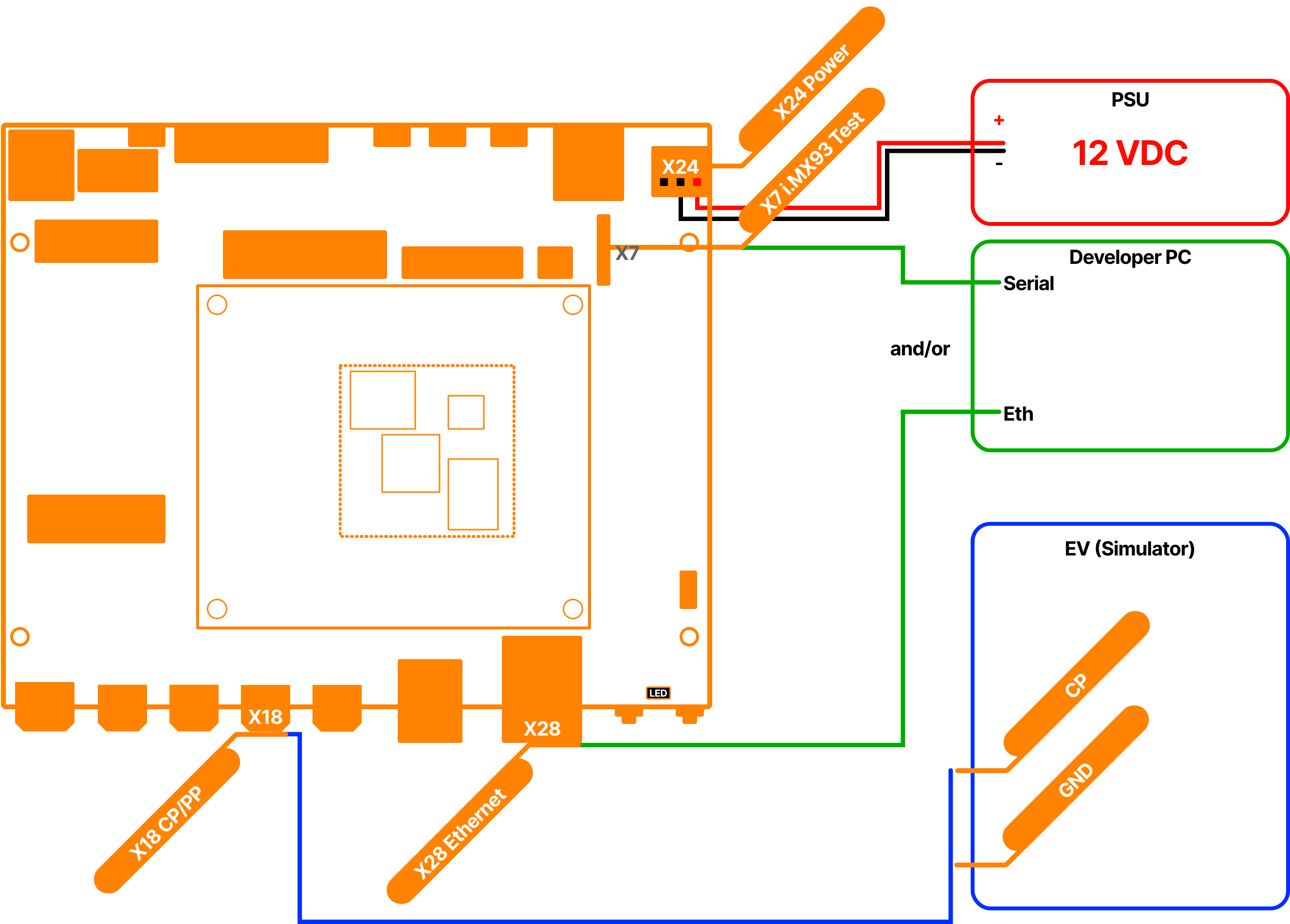
Fig. 1 Figure: Basic Setup of the DC charger with the Charge SOM
Note
The pin assignment of the Charge SOM Evaluation Kit can be found in the datasheet.
Note
Before you start setting up the hardware, please check whether the HW components used are also listed in Hardware Components section.
First Startup
Boot Process
Here are some key points about the boot process of the Charge controller:
The file system basically consists of three ext4 partitions. Two partitions are used as slots for the RAUC update process. The third partition is not touched by the RAUC update process and is usually used for storing update bundles, logs, etc.
After connecting the Charge controller to the power supply, the U-Boot bootloader starts the currently active slot managed by RAUC.
The LED status indicators on the carrier board provide information about the current status of the boot process.
EVerest is automatically started with the default configuration of chargebyte after the boot process is completed. The initial configuration is explained in the Initial Configuration section.
Understanding LED Status Indicators
Now you can connect the Charge SOM Evaluation Kit (X24) to the power supply. The LED status indicator on the carrier board provide information about the current status of the boot process. The following table shows the meaning of the LED status indicators:
State |
LED indication |
Behavior |
|---|---|---|
Boot process running |
LED (red) |
periodic blinking for approx. 4 sec. |
Operating system running |
LED (red) |
rhythmic blinking |
Connecting via SSH or Serial Interface
For debugging, there are two ways to connect the developer computer to the Charge controller: via SSH or via serial interface. The following sections explain how to connect to the Charge controller using PuTTY. You can also use other terminal programs (like e.g. MobaXTerm) to connect to the Charge controller.
SSH Connection with PuTTY
Here are the steps to connect to the Charge controller via SSH using PuTTY:
Install PuTTY on your computer. You can download PuTTY from the following link: PuTTY Download.
Connect the Charge controller over Ethernet to your computer.
Start PuTTY and enter the IPv4 fallback address “169.254.12.53” of the Charge controller in the “Host Name (or IP address)” field (See figure PuTTY SSH Configuration).
Click on “Save” to save the configuration and then click on “Open” to start the connection.
A PuTTY Security Alert window will appear. Click on “Accept” to continue.
Enter the username “root” and the password “zebematado” to log in to the Charge controller.
Note
The username can also be stored under “Connection -> Data -> Auto-login username” in the PuTTY configuration.
Note
It is also possible to install an SSH key on the Charge controller to log in without a password. Please look online for instructions on how to do this on a Linux system.
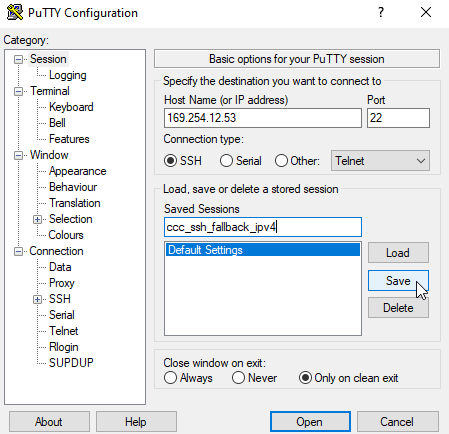
Fig. 2 Figure: PuTTY SSH Configuration
Serial Connection with PuTTY
Here are the steps to connect to the Charge controller via serial interface using PuTTY:
Install PuTTY on your computer. You can download PuTTY from the following link: PuTTY Download.
Connect the Charge controller to your computer via USB to serial adapter.
Start PuTTY and configure the COM port of the USB to serial adapter (e.g. “COM1”) in the “Serial line” field. Note: You can find the COM port of the USB to serial adapter in the Windows Device Manager under “Ports (COM & LPT)”.
Switch to Connection -> Serial configuration and set the “Speed” to 115200, “Data bits” to 8, “Stop bits” to 1, “Parity” to “None” and “Flow control” to “None” (See figure PuTTY Serial Configuration).
Switch back to the “Session” and click on “Save” to save the configuration (See figure PuTTY Save Serial Connection).
Click on “Open” to start the connection.
Now a black window will appear. Press enter to get the login prompt.
Enter the username “root” and the password “zebematado” to log in to the Charge controller.
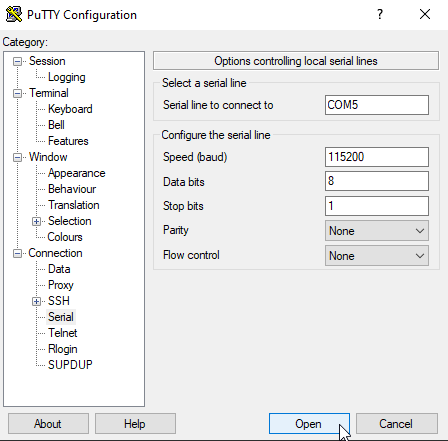
Fig. 3 Figure: PuTTY Serial Configuration
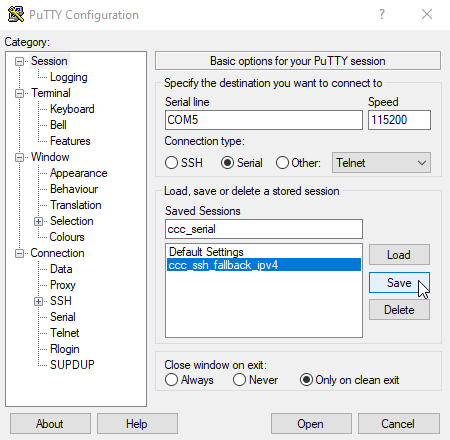
Fig. 4 Figure: PuTTY Save Serial Connection
Initial Configuration
Now you are connected to the Charge SOM and we can take a deeper look at the initial configuration.
The configuration files of the EVerest charging stack are stored in the directory “/etc/everest”. EVerest uses the YAML format for the configuration files. EVerest runs as a systemd service that by default uses “/etc/everest/config.yaml” as a configuration setup. If you take a look at the content of the configuration file, you will see that it is only a reference to the “bsp-only-dc.yaml” file.
Note
If you create an own configuration file, you can also store it in the “/etc/everest” directory and create a symbolic link to it like “ln -sf /etc/everest/my-config.yaml /etc/everest/config.yaml”.
root@chargesom:/etc/everest# ls -l /etc/everest/
total 28
-rw-r--r-- 1 root root 1134 Jun 20 07:45 bsp-only-dc.yaml
lrwxrwxrwx 1 root root   14 Jun 25 19:26 config.yaml ->  my-config.yaml
Let’s take a look at the content of the bsp-only-dc.yaml configuration file. This file is already prepared for the basic DC charger setup.
Just type “less /etc/everest/bsp-only-dc.yaml” to see the content of the configuration file:
  1#
  2# This is an example configuration for free DC charging
  3#
  4active_modules:
  5  api:
  6    module: API
  7    connections:
  8      evse_manager:
  9        - module_id: connector
 10          implementation_id: evse
 11      error_history:
 12        - module_id: error_history
 13          implementation_id: error_history
 14  bsp:
 15    module: CbChargeSOMDriver
 16  connector:
 17    module: EvseManager
 18    config_module:
 19      connector_id: 1
 20      charge_mode: DC
 21      evse_id: DE*CHB*E123456*1
 22      evse_id_din: 49A80737A45678
 23      session_logging: true
 24      session_logging_path: /tmp/everest-logs
 25      session_logging_xml: false
 26    connections:
 27      bsp:
 28        - module_id: bsp
 29          implementation_id: evse_board_support
 30      slac:
 31        - module_id: evse_slac
 32          implementation_id: main
 33      powersupply_DC:
 34        - module_id: powersupply_dc
 35          implementation_id: main
 36      imd:
 37        - module_id: imd
 38          implementation_id: main
 39      hlc:
 40        - module_id: iso15118_charger
 41          implementation_id: charger
 42  energy_manager:
 43    module: EnergyManager
 44    connections:
 45      energy_trunk:
 46        - module_id: grid_connection_point
 47          implementation_id: energy_grid
 48  grid_connection_point:
 49    module: EnergyNode
 50    config_module:
 51      fuse_limit_A: 16
 52      phase_count: 3
 53    connections:
 54      energy_consumer:
 55        - module_id: connector
 56          implementation_id: energy_grid
 57  error_history:
 58    module: ErrorHistory
 59    config_implementation:
 60      error_history:
 61        database_path: /tmp/error_history.db
 62  iso15118_charger:
 63    module: EvseV2G
 64    config_module:
 65      device: eth1
 66    connections:
 67      security:
 68        - module_id: evse_security
 69          implementation_id: main
 70  evse_security:
 71    module: EvseSecurity
 72    config_module:
 73      private_key_password: "123456"
 74  evse_slac:
 75    module: EvseSlac
 76    config_implementation:
 77      main:
 78        device: eth1
 79  auth:
 80    module: Auth
 81    config_module:
 82      connection_timeout: 10
 83      prioritize_authorization_over_stopping_transaction: true
 84      selection_algorithm: PlugEvents
 85    connections:
 86      token_provider:
 87        - module_id: token_provider
 88          implementation_id: main
 89      token_validator:
 90        - module_id: token_validator
 91          implementation_id: main
 92      evse_manager:
 93        - module_id: connector
 94          implementation_id: evse
 95  powersupply_dc:
 96    module: DCSupplySimulator
 97  imd:
 98    module: IMDSimulator
 99  token_provider:
100    module: DummyTokenProvider
101    config_implementation:
102      main:
103        timeout: 10
104        token: DEADBEEF
105        type: RFID
106    connections:
107      evse:
108        - module_id: connector
109          implementation_id: evse
110  token_validator:
111    module: DummyTokenValidator
112    config_implementation:
113      main:
114        sleep: 0.25
115        validation_reason: Token seems valid
116        validation_result: Accepted
In general, the EVerest charging stack consists of different modules, each of which fulfills a specific task. An EVerest module provides and requests interfaces. The configuration file shows which EVerest modules are activated, how they are configured and how they are connected to each other over the interfaces. The following figure illustrates how the EVerest modules are connected to each other:
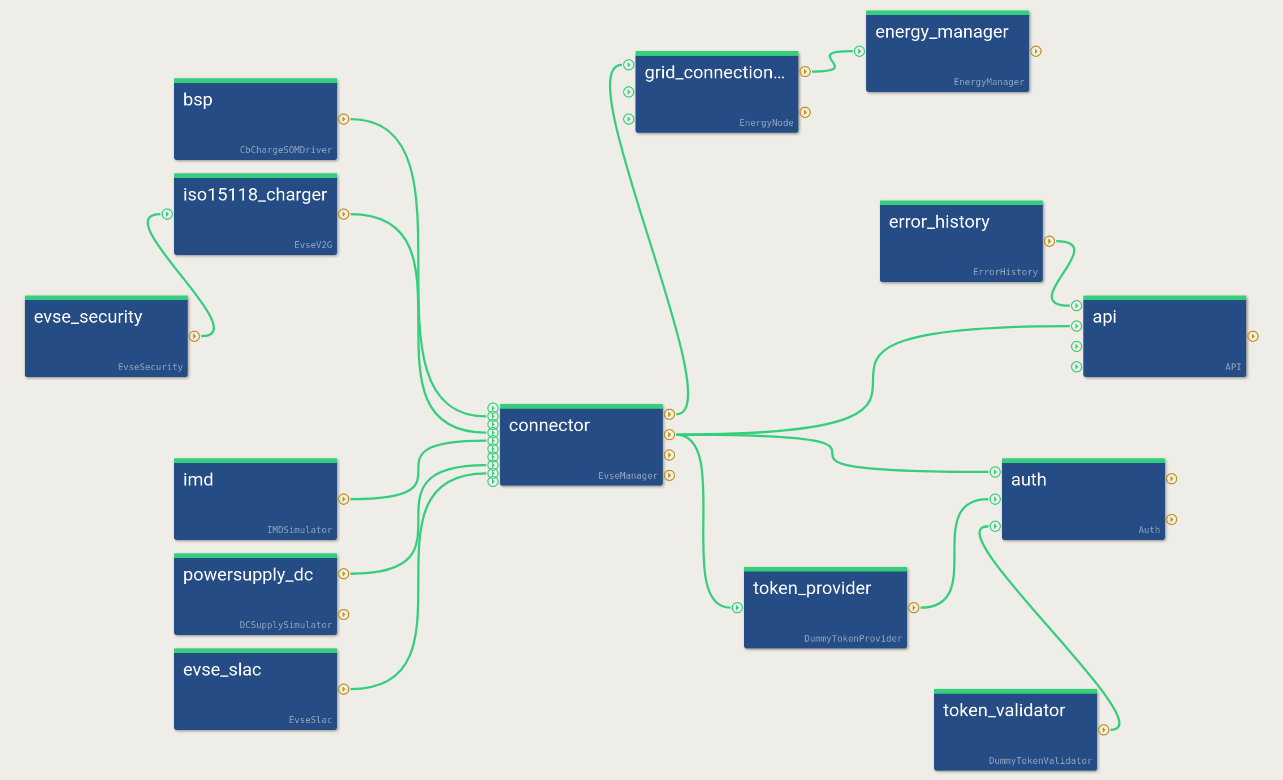
Fig. 5 Figure: EVerest admin panel view of the bsp-only-dc.yaml configuration
However, not all configuration parameters of the modules are shown here. Only the configuration parameters that do not match the default configuration of the respective module need to be specified here. Depending on the installed hardware components, the configuration file may need to be adapted. The hardware related tasks are mainly handled by the CbChargeSOMDriver module. The configuration of the CbChargeSOMDriver module can be found in “/usr/libexec/everest/modules/CbChargeSOMDriver” directory.
Each module has a description of all configuration parameter including their defaults. This file is called “manifest.yaml” and is stored in the main directory of the module. In order to see the content of the configuration file you can take a look using “less /usr/libexec/everest/modules/CbChargeSOMDriver/manifest.yaml” to see the content of the manifest file and check whether the configuration fits to your hardware setup.
If you want to change a configuration parameter of a module, which is not part of your EVerest YAML configuration file, just copy the specific configuration key from the “manifest.yaml” file of the module to the module specific “config_module” space in your EVerest configuration and adjust the value. Please note if you change it directly in the “manifest.yaml” file of a module, the changes will be get lost after a software update.
Here is an excerpt of an EVerest configuration to change the parameter “evse_id” to “MY*CUS*T654321*1” of the CbChargeSOMDriver module.
bsp:
  module: CbChargeSOMDriver
connector:
  module: EvseManager
  config_module:
    connector_id: 1
    charge_mode: DC
    evse_id: MY*CUS*T654321*1
After adjusting the configuration file, you have to restart the EVerest charging stack to apply the changes. Just type “systemctl restart everest” to restart the EVerest charging stack.
Note
You can also use the EVerest admin panel to adjust the EVerest configuration in a GUI. This tool must currently be installed manually on your developer computer, because the resources on the board are limited.
Note
If you have made a mistake in the configuration file, the EVerest charging stack will not start. Therefore, it is recommended to back up the original configuration file before making changes.
Starting and Monitoring the Charging Process
Before we start the first charging session, we shall open the EVerest log to monitor the charging process. The EVerest log is stored in the systemd journal and can be accessed via the journalctl command. The journalctl command provides a lot of options to filter the log messages. Now just type “journalctl -f -u everest -n 50” to see the last 50 log messages of the EVerest charging stack and to follow the charging process in real time. For more information about the EVerest log, see the Logging and Debugging chapter.
The EVerest log should look like this:
root@chargesom:~# journalctl -f -u everest -n 50
2024-12-13T15:45:00.514151+0100 chargesom sh[237]: Starting to migrate EVerest configurations
2024-12-13T15:45:00.532706+0100 chargesom sh[237]: EVerest configurations migrated successfully
2024-12-13T15:45:00.561214+0100 chargesom systemd[1]: Started EVerest.
2024-12-13T15:45:00.779573+0100 chargesom manager[241]: [INFO] manager          ::   ________      __                _
2024-12-13T15:45:00.779573+0100 chargesom manager[241]: [INFO] manager          ::  |  ____\ \    / /               | |
2024-12-13T15:45:00.779573+0100 chargesom manager[241]: [INFO] manager          ::  | |__   \ \  / /__ _ __ ___  ___| |_
2024-12-13T15:45:00.779573+0100 chargesom manager[241]: [INFO] manager          ::  |  __|   \ \/ / _ \ '__/ _ \/ __| __|
2024-12-13T15:45:00.779573+0100 chargesom manager[241]: [INFO] manager          ::  | |____   \  /  __/ | |  __/\__ \ |_
2024-12-13T15:45:00.779573+0100 chargesom manager[241]: [INFO] manager          ::  |______|   \/ \___|_|  \___||___/\__|
2024-12-13T15:45:00.779573+0100 chargesom manager[241]: [INFO] manager          ::
2024-12-13T15:45:00.781629+0100 chargesom manager[241]: [INFO] manager          :: everest-framework 0.17.2 main@v0.17.2-dirty
2024-12-13T15:45:00.781629+0100 chargesom manager[241]: [INFO] manager          :: everest-core 2024.9.0 main@2024.9.0-rc1-40-g1e06aaab-dirty
2024-12-13T15:45:00.781629+0100 chargesom manager[241]: [INFO] manager          ::
2024-12-13T15:45:00.781629+0100 chargesom manager[241]: [INFO] manager          :: Using MQTT broker localhost:1883
2024-12-13T15:45:00.811618+0100 chargesom manager[242]: [INFO] everest_ctrl     :: Launching controller service on port 8849
2024-12-13T15:45:00.862280+0100 chargesom manager[241]: [INFO] manager          :: Loading config file at: /etc/everest/config.yaml
2024-12-13T15:45:01.239004+0100 chargesom manager[241]: [INFO] manager          :: Config loading completed in 451ms
2024-12-13T15:45:03.899562+0100 chargesom manager[260]: [INFO] api:API          :: Module api initialized [2594ms]
2024-12-13T15:45:04.376658+0100 chargesom manager[266]: [INFO] evse_security:E  :: Module evse_security initialized [2751ms]
2024-12-13T15:45:04.704404+0100 chargesom manager[264]: [INFO] energy_manager:  :: Module energy_manager initialized [3237ms]
2024-12-13T15:45:05.093575+0100 chargesom manager[261]: [INFO] auth:Auth        :: Module auth initialized [3776ms]
2024-12-13T15:45:05.237957+0100 chargesom manager[267]: [INFO] evse_slac:EvseS  :: Module evse_slac initialized [3623ms]
2024-12-13T15:45:05.364804+0100 chargesom manager[269]: [INFO] imd:IMDSimulato  :: Module imd initialized [3755ms]
2024-12-13T15:45:05.485234+0100 chargesom manager[262]: [INFO] bsp:CbChargeSOM  :: chargebyte's Charge SOM EVerest module (version: 0.16.0)
2024-12-13T15:45:05.486334+0100 chargesom manager[262]: [INFO] bsp:CbChargeSOM  :: Module bsp initialized [4145ms]
2024-12-13T15:45:05.569128+0100 chargesom manager[271]: [INFO] powersupply_dc:  :: Module powersupply_dc initialized [3777ms]
2024-12-13T15:45:05.578465+0100 chargesom manager[268]: [INFO] grid_connection  :: Module grid_connection_point initialized [4042ms]
2024-12-13T15:45:05.643080+0100 chargesom manager[270]: [INFO] iso15118_charge  :: Module iso15118_charger initialized [3811ms]
2024-12-13T15:45:05.660663+0100 chargesom manager[265]: [INFO] error_history:E  :: Resetting database
2024-12-13T15:45:05.672632+0100 chargesom manager[273]: [INFO] token_validator  :: Module token_validator initialized [3779ms]
2024-12-13T15:45:05.684368+0100 chargesom manager[265]: [INFO] error_history:E  :: Module error_history initialized [4205ms]
2024-12-13T15:45:05.706916+0100 chargesom manager[272]: [INFO] token_provider:  :: Module token_provider initialized [3957ms]
2024-12-13T15:45:05.857535+0100 chargesom manager[263]: [INFO] connector:EvseM  :: Module connector initialized [4295ms]
2024-12-13T15:45:05.904734+0100 chargesom manager[241]: [INFO] manager          :: 🚙🚙🚙 All modules are initialized. EVerest up and running [5162ms] 🚙🚙🚙
2024-12-13T15:45:05.911103+0100 chargesom manager[270]: [INFO] iso15118_charge  :: TCP server on eth1 is listening on port [fe80::2c04:d5ff:fe18:78a7%3]:61341
2024-12-13T15:45:05.911444+0100 chargesom manager[270]: [INFO] iso15118_charge  :: SDP socket setup succeeded
2024-12-13T15:45:05.937212+0100 chargesom manager[267]: [INFO] evse_slac:EvseS  :: Starting the SLAC state machine
2024-12-13T15:45:06.137657+0100 chargesom manager[267]: [INFO] evse_slac:EvseS  :: Entered Reset state
2024-12-13T15:45:06.138098+0100 chargesom manager[267]: [INFO] evse_slac:EvseS  :: New NMK key: 32:47:36:36:38:36:4F:55:58:34:4A:39:45:4A:46:4A
2024-12-13T15:45:06.141405+0100 chargesom manager[267]: [INFO] evse_slac:EvseS  :: Received CM_SET_KEY_CNF
2024-12-13T15:45:06.142173+0100 chargesom manager[267]: [INFO] evse_slac:EvseS  :: Entered Idle state
2024-12-13T15:45:06.390594+0100 chargesom manager[270]: [INFO] iso15118_charge  :: Ignoring bidirectional SupportedEnergyTransferMode
2024-12-13T15:45:11.539400+0100 chargesom manager[263]: [INFO] connector:EvseM  :: Cleaning up any other transaction on start up
2024-12-13T15:45:11.672232+0100 chargesom manager[263]: [INFO] connector:EvseM  :: 🌀🌀🌀 Ready to start charging 🌀🌀🌀
2024-12-13T15:45:11.672232+0100 chargesom manager[263]: [WARN] connector:EvseM void module::EvseManager::ready_to_start_charging() :: No powermeter value received yet!
2024-12-13T15:45:11.805756+0100 chargesom manager[262]: [INFO] bsp:CbChargeSOM  :: handle_enable: Setting new duty cycle of 100.00%
2024-12-13T15:45:12.119474+0100 chargesom manager[262]: [INFO] bsp:CbChargeSOM  :: handle_pwm_off: Setting new duty cycle of 100.00%
2024-12-13T15:45:12.190889+0100 chargesom manager[263]: [INFO] connector:EvseM  :: All errors cleared
2024-12-13T15:45:12.260924+0100 chargesom manager[262]: [INFO] bsp:CbChargeSOM  :: CP state change from PowerOn to A, U_CP+: 12196 mV, U_CP-: -303 mV
2024-12-13T15:45:12.305158+0100 chargesom manager[262]: [INFO] bsp:CbChargeSOM  :: handle_pwm_off: Setting new duty cycle of 100.00%
Before connecting the CP line between Charge SOM Evaluation Kit and the EV simulator, please make sure that the following things are fulfilled:
GND from X18 is connected to the EV simulator
PP from X18 is not connected to the EV simulator
EV simulator is powered up
EV simulator must configured to DIN 70121 or ISO 15118-2 DC EIM (No TLS)
After connecting the CP line, a CP state change from “A” to “B” should be visible in the EVerest log. The duty cycle should directly switch from 100% to 5%. The duty cycle change indicates the EVSE is now ready for high level communication.
The EVerest log messages should look like this:
2024-12-13T15:52:01.800939+0100 chargesom manager[262]: [INFO] bsp:CbChargeSOM  :: CP state change from A to B, U_CP+: 9150 mV, U_CP-: -300 mV
2024-12-13T15:52:01.843375+0100 chargesom manager[267]: [INFO] evse_slac:EvseS  :: Entered Matching state, waiting for CM_SLAC_PARM_REQ
2024-12-13T15:52:01.959010+0100 chargesom manager[263]: [INFO] connector:EvseM  :: SYS  Session logging started.
2024-12-13T15:52:01.960014+0100 chargesom manager[263]: [INFO] connector:EvseM  :: EVSE IEC Session Started: EVConnected
2024-12-13T15:52:01.962704+0100 chargesom manager[272]: [INFO] token_provider:  :: Publishing new dummy token: {
2024-12-13T15:52:01.962704+0100 chargesom manager[272]:     "type": "ISO14443",
2024-12-13T15:52:01.962704+0100 chargesom manager[272]:     "value": "DEADBEEF"
2024-12-13T15:52:01.962704+0100 chargesom manager[272]: } (RFID)
2024-12-13T15:52:01.967069+0100 chargesom manager[261]: [INFO] auth:Auth        :: Received new token: {
2024-12-13T15:52:01.967069+0100 chargesom manager[261]:     "authorization_type": "RFID",
2024-12-13T15:52:01.967069+0100 chargesom manager[261]:     "id_token": {
2024-12-13T15:52:01.967069+0100 chargesom manager[261]:         "type": "ISO14443",
2024-12-13T15:52:01.967069+0100 chargesom manager[261]:         "value": "DEADBEEF"
2024-12-13T15:52:01.967069+0100 chargesom manager[261]:     }
2024-12-13T15:52:01.967069+0100 chargesom manager[261]: }
2024-12-13T15:52:01.970206+0100 chargesom manager[273]: [INFO] token_validator  :: Got validation request for token: DEADBEEF
2024-12-13T15:52:02.220655+0100 chargesom manager[273]: [INFO] token_validator  :: Returning validation status: Accepted
2024-12-13T15:52:02.223254+0100 chargesom manager[261]: [INFO] auth:Auth        :: Providing authorization to connector#1
2024-12-13T15:52:02.960278+0100 chargesom manager[263]: [INFO] connector:EvseM  :: EVSE IEC Set PWM On (5.000000074505806%) took 0 ms
2024-12-13T15:52:02.962409+0100 chargesom manager[262]: [INFO] bsp:CbChargeSOM  :: handle_pwm_on: Setting new duty cycle of 5.00%
2024-12-13T15:52:03.105628+0100 chargesom manager[261]: [INFO] auth:Auth        :: Result for token: DEADBEEF: ACCEPTED
2024-12-13T15:52:03.155035+0100 chargesom manager[263]: [INFO] connector:EvseM  :: EVSE IEC EIM Authorization received
2024-12-13T15:52:03.155499+0100 chargesom manager[263]: [INFO] connector:EvseM  :: EVSE IEC Transaction Started (0 kWh)
2024-12-13T15:52:03.156415+0100 chargesom manager[263]: [INFO] connector:EvseM  :: EVSE IEC DC mode. We are in 5percent mode so we can continue without further action.
2024-12-13T15:52:03.156895+0100 chargesom manager[263]: [INFO] connector:EvseM  :: EVSE IEC Charger state: Wait for Auth->PrepareCharging
After that, the EV simulator should establish a powerline connection to the Charge SOM via SLAC.
2024-12-13T15:52:04.060237+0100 chargesom manager[267]: [INFO] evse_slac:EvseS  :: Session (run_id=D895B977488179F2, ev_mac=00:01:87:05:A0:84): initialized, waiting for CM_START_ATTEN_CHAR_IND
2024-12-13T15:52:04.076565+0100 chargesom manager[267]: [INFO] evse_slac:EvseS  :: Session (run_id=D895B977488179F2, ev_mac=00:01:87:05:A0:84): received CM_START_ATTEN_CHAR_IND, going to substate SOUNDING
2024-12-13T15:52:04.116823+0100 chargesom manager[267]: [INFO] evse_slac:EvseS  :: Session (run_id=D895B977488179F2, ev_mac=00:01:87:05:A0:84): needs to be in state WAIT_FOR_START_ATTEN_CHAR for CM_START_ATTEN_CHAR_IND
2024-12-13T15:52:04.153137+0100 chargesom manager[267]: [INFO] evse_slac:EvseS  :: Session (run_id=D895B977488179F2, ev_mac=00:01:87:05:A0:84): needs to be in state WAIT_FOR_START_ATTEN_CHAR for CM_START_ATTEN_CHAR_IND
2024-12-13T15:52:04.187964+0100 chargesom manager[267]: [INFO] evse_slac:EvseS  :: Session (run_id=D895B977488179F2, ev_mac=00:01:87:05:A0:84): received CM_MNBC_SOUND_IND
2024-12-13T15:52:04.195990+0100 chargesom manager[267]: [INFO] evse_slac:EvseS  :: Session (run_id=D895B977488179F2, ev_mac=00:01:87:05:A0:84): received CM_ATTEN_PROFILE_IND
2024-12-13T15:52:04.223092+0100 chargesom manager[267]: [INFO] evse_slac:EvseS  :: Session (run_id=D895B977488179F2, ev_mac=00:01:87:05:A0:84): received CM_MNBC_SOUND_IND
2024-12-13T15:52:04.230817+0100 chargesom manager[267]: [INFO] evse_slac:EvseS  :: Session (run_id=D895B977488179F2, ev_mac=00:01:87:05:A0:84): received CM_ATTEN_PROFILE_IND
2024-12-13T15:52:04.259234+0100 chargesom manager[267]: [INFO] evse_slac:EvseS  :: Session (run_id=D895B977488179F2, ev_mac=00:01:87:05:A0:84): received CM_MNBC_SOUND_IND
2024-12-13T15:52:04.267262+0100 chargesom manager[267]: [INFO] evse_slac:EvseS  :: Session (run_id=D895B977488179F2, ev_mac=00:01:87:05:A0:84): received CM_ATTEN_PROFILE_IND
2024-12-13T15:52:04.294947+0100 chargesom manager[267]: [INFO] evse_slac:EvseS  :: Session (run_id=D895B977488179F2, ev_mac=00:01:87:05:A0:84): received CM_MNBC_SOUND_IND
2024-12-13T15:52:04.302506+0100 chargesom manager[267]: [INFO] evse_slac:EvseS  :: Session (run_id=D895B977488179F2, ev_mac=00:01:87:05:A0:84): received CM_ATTEN_PROFILE_IND
2024-12-13T15:52:04.330610+0100 chargesom manager[267]: [INFO] evse_slac:EvseS  :: Session (run_id=D895B977488179F2, ev_mac=00:01:87:05:A0:84): received CM_MNBC_SOUND_IND
2024-12-13T15:52:04.338308+0100 chargesom manager[267]: [INFO] evse_slac:EvseS  :: Session (run_id=D895B977488179F2, ev_mac=00:01:87:05:A0:84): received CM_ATTEN_PROFILE_IND
2024-12-13T15:52:04.365795+0100 chargesom manager[267]: [INFO] evse_slac:EvseS  :: Session (run_id=D895B977488179F2, ev_mac=00:01:87:05:A0:84): received CM_MNBC_SOUND_IND
2024-12-13T15:52:04.373390+0100 chargesom manager[267]: [INFO] evse_slac:EvseS  :: Session (run_id=D895B977488179F2, ev_mac=00:01:87:05:A0:84): received CM_ATTEN_PROFILE_IND
2024-12-13T15:52:04.401378+0100 chargesom manager[267]: [INFO] evse_slac:EvseS  :: Session (run_id=D895B977488179F2, ev_mac=00:01:87:05:A0:84): received CM_MNBC_SOUND_IND
2024-12-13T15:52:04.409026+0100 chargesom manager[267]: [INFO] evse_slac:EvseS  :: Session (run_id=D895B977488179F2, ev_mac=00:01:87:05:A0:84): received CM_ATTEN_PROFILE_IND
2024-12-13T15:52:04.437202+0100 chargesom manager[267]: [INFO] evse_slac:EvseS  :: Session (run_id=D895B977488179F2, ev_mac=00:01:87:05:A0:84): received CM_MNBC_SOUND_IND
2024-12-13T15:52:04.444880+0100 chargesom manager[267]: [INFO] evse_slac:EvseS  :: Session (run_id=D895B977488179F2, ev_mac=00:01:87:05:A0:84): received CM_ATTEN_PROFILE_IND
2024-12-13T15:52:04.473470+0100 chargesom manager[267]: [INFO] evse_slac:EvseS  :: Session (run_id=D895B977488179F2, ev_mac=00:01:87:05:A0:84): received CM_MNBC_SOUND_IND
2024-12-13T15:52:04.481479+0100 chargesom manager[267]: [INFO] evse_slac:EvseS  :: Session (run_id=D895B977488179F2, ev_mac=00:01:87:05:A0:84): received CM_ATTEN_PROFILE_IND
2024-12-13T15:52:04.509108+0100 chargesom manager[267]: [INFO] evse_slac:EvseS  :: Session (run_id=D895B977488179F2, ev_mac=00:01:87:05:A0:84): received CM_MNBC_SOUND_IND
2024-12-13T15:52:04.517101+0100 chargesom manager[267]: [INFO] evse_slac:EvseS  :: Session (run_id=D895B977488179F2, ev_mac=00:01:87:05:A0:84): received CM_ATTEN_PROFILE_IND
2024-12-13T15:52:04.517383+0100 chargesom manager[267]: [INFO] evse_slac:EvseS  :: Session (run_id=D895B977488179F2, ev_mac=00:01:87:05:A0:84): received all sounds, going to substate FINALIZE_SOUNDING
2024-12-13T15:52:04.561486+0100 chargesom manager[267]: [INFO] evse_slac:EvseS  :: Session (run_id=D895B977488179F2, ev_mac=00:01:87:05:A0:84): Finalize sounding, sending CM_ATTEN_CHAR_IND
2024-12-13T15:52:04.577453+0100 chargesom manager[267]: [INFO] evse_slac:EvseS  :: Session (run_id=D895B977488179F2, ev_mac=00:01:87:05:A0:84): received CM_ATTEN_CHAR_RSP, going to substate WAIT_FOR_SLAC_MATCH
2024-12-13T15:52:04.615447+0100 chargesom manager[267]: [INFO] evse_slac:EvseS  :: Session (run_id=D895B977488179F2, ev_mac=00:01:87:05:A0:84): Received CM_SLAC_MATCH_REQ, sending CM_SLAC_MATCH_CNF -> session complete
2024-12-13T15:52:04.616909+0100 chargesom manager[267]: [INFO] evse_slac:EvseS  :: Entered Matched state
2024-12-13T15:52:04.637408+0100 chargesom manager[263]: [INFO] connector:EvseM  :: EVSE ISO SLAC MATCHED
2024-12-13T15:52:04.661360+0100 chargesom manager[263]: [INFO] connector:EvseM  :: EVSE ISO D-LINK_READY (true)
Now the EV simulator discovers the V2G service of the Charge SOM and establishes a TCP connection. Both hosts negotiate the protocol ISO 15118-2 and start a charging session. Since the setup lacks some components of a real DC charger (e.g. HV contactors, power modules) only the state ChargeParameterDiscovery will be reached.
2024-12-13T15:52:06.094909+0100 chargesom manager[270]: [INFO] iso15118_charge  :: Received packet from [fe80::201:87ff:fe05:a084]:52403 with security 0x10 and protocol 0x00
2024-12-13T15:52:06.094909+0100 chargesom manager[270]: [INFO] iso15118_charge  :: SDP requested NO-TLS, announcing NO-TLS
2024-12-13T15:52:06.094909+0100 chargesom manager[270]: [INFO] iso15118_charge  :: sendto([fe80::201:87ff:fe05:a084]:52403) succeeded
2024-12-13T15:52:06.136758+0100 chargesom manager[270]: [INFO] iso15118_charge  :: Incoming connection on eth1 from [a00:f192:0:0:fe80::]:61842
2024-12-13T15:52:06.137338+0100 chargesom manager[270]: [INFO] iso15118_charge  :: Started new TCP connection thread
2024-12-13T15:52:06.413206+0100 chargesom manager[270]: [INFO] iso15118_charge  :: Handling SupportedAppProtocolReq
2024-12-13T15:52:06.414011+0100 chargesom manager[270]: [INFO] iso15118_charge  :: Protocol negotiation was successful. Selected protocol is ISO15118
2024-12-13T15:52:06.445910+0100 chargesom manager[263]: [INFO] connector:EvseM  ::                                     CAR ISO V2G SupportedAppProtocolReq
2024-12-13T15:52:06.457489+0100 chargesom manager[263]: [INFO] connector:EvseM  :: EVSE ISO V2G SupportedAppProtocolRes
2024-12-13T15:52:06.735253+0100 chargesom manager[270]: [INFO] iso15118_charge  :: SessionSetupReq.EVCCID: 00:01:87:05:A0:84
2024-12-13T15:52:06.735253+0100 chargesom manager[270]: [INFO] iso15118_charge  :: No session_id found or not equal to the id from the preceding v2g session. Generating random session id.
2024-12-13T15:52:06.735253+0100 chargesom manager[270]: [INFO] iso15118_charge  :: Created new session with id 0x17000314371076655851
2024-12-13T15:52:06.736833+0100 chargesom manager[263]: [INFO] connector:EvseM  ::                                     CAR ISO V2G SessionSetupReq
2024-12-13T15:52:06.845708+0100 chargesom manager[263]: [INFO] connector:EvseM  :: EVSE ISO V2G SessionSetupRes
2024-12-13T15:52:07.142205+0100 chargesom manager[263]: [INFO] connector:EvseM  ::                                     CAR ISO V2G ServiceDiscoveryReq
2024-12-13T15:52:07.240688+0100 chargesom manager[263]: [INFO] connector:EvseM  :: EVSE ISO V2G ServiceDiscoveryRes
2024-12-13T15:52:07.567095+0100 chargesom manager[263]: [INFO] connector:EvseM  ::                                     CAR ISO V2G ServiceDetailReq
2024-12-13T15:52:07.621170+0100 chargesom manager[263]: [INFO] connector:EvseM  :: EVSE ISO V2G ServiceDetailRes
2024-12-13T15:52:07.921406+0100 chargesom manager[270]: [INFO] iso15118_charge  :: SelectedPaymentOption: ExternalPayment
2024-12-13T15:52:07.924122+0100 chargesom manager[263]: [INFO] connector:EvseM  ::                                     CAR ISO V2G PaymentServiceSelectionReq
2024-12-13T15:52:08.053648+0100 chargesom manager[263]: [INFO] connector:EvseM  :: EVSE ISO V2G PaymentServiceSelectionRes
2024-12-13T15:52:08.338864+0100 chargesom manager[263]: [INFO] connector:EvseM  ::                                     CAR ISO V2G AuthorizationReq
2024-12-13T15:52:08.391710+0100 chargesom manager[263]: [INFO] connector:EvseM  :: EVSE ISO V2G AuthorizationRes
2024-12-13T15:52:08.689864+0100 chargesom manager[263]: [INFO] connector:EvseM  ::                                     CAR ISO V2G AuthorizationReq
2024-12-13T15:52:08.764375+0100 chargesom manager[263]: [INFO] connector:EvseM  :: EVSE ISO V2G AuthorizationRes
2024-12-13T15:52:09.049641+0100 chargesom manager[270]: [INFO] iso15118_charge  :: Parameter-phase started
2024-12-13T15:52:09.049641+0100 chargesom manager[270]: [INFO] iso15118_charge  :: Selected energy transfer mode: DC_extended
2024-12-13T15:52:09.057571+0100 chargesom manager[263]: [INFO] connector:EvseM  :: Received EV maximum limits: {
2024-12-13T15:52:09.057571+0100 chargesom manager[263]:     "dc_ev_maximum_current_limit": 0.0,
2024-12-13T15:52:09.057571+0100 chargesom manager[263]:     "dc_ev_maximum_voltage_limit": 0.0
2024-12-13T15:52:09.057571+0100 chargesom manager[263]: }
2024-12-13T15:52:09.058568+0100 chargesom manager[263]: [INFO] connector:EvseM  ::                                     CAR ISO V2G ChargeParameterDiscoveryReq
2024-12-13T15:52:09.147996+0100 chargesom manager[263]: [INFO] connector:EvseM  :: EVSE ISO V2G ChargeParameterDiscoveryRes
Congratulations! You have successfully established a charging session with the EVerest charging stack and the Charge SOM. Now you are prepared to start your own charging project and adjust your setup to your needs. The following chapters will help you understand the EVerest charging stack and Charge SOM in more detail and gain deeper insight into the configuration.