Hardware Interfaces
Since the Charge SOM itself is a module which cannot be used without a carrier board, the following sections refer to the Charge SOM Evaluation Board as an example.
Wiring Overview
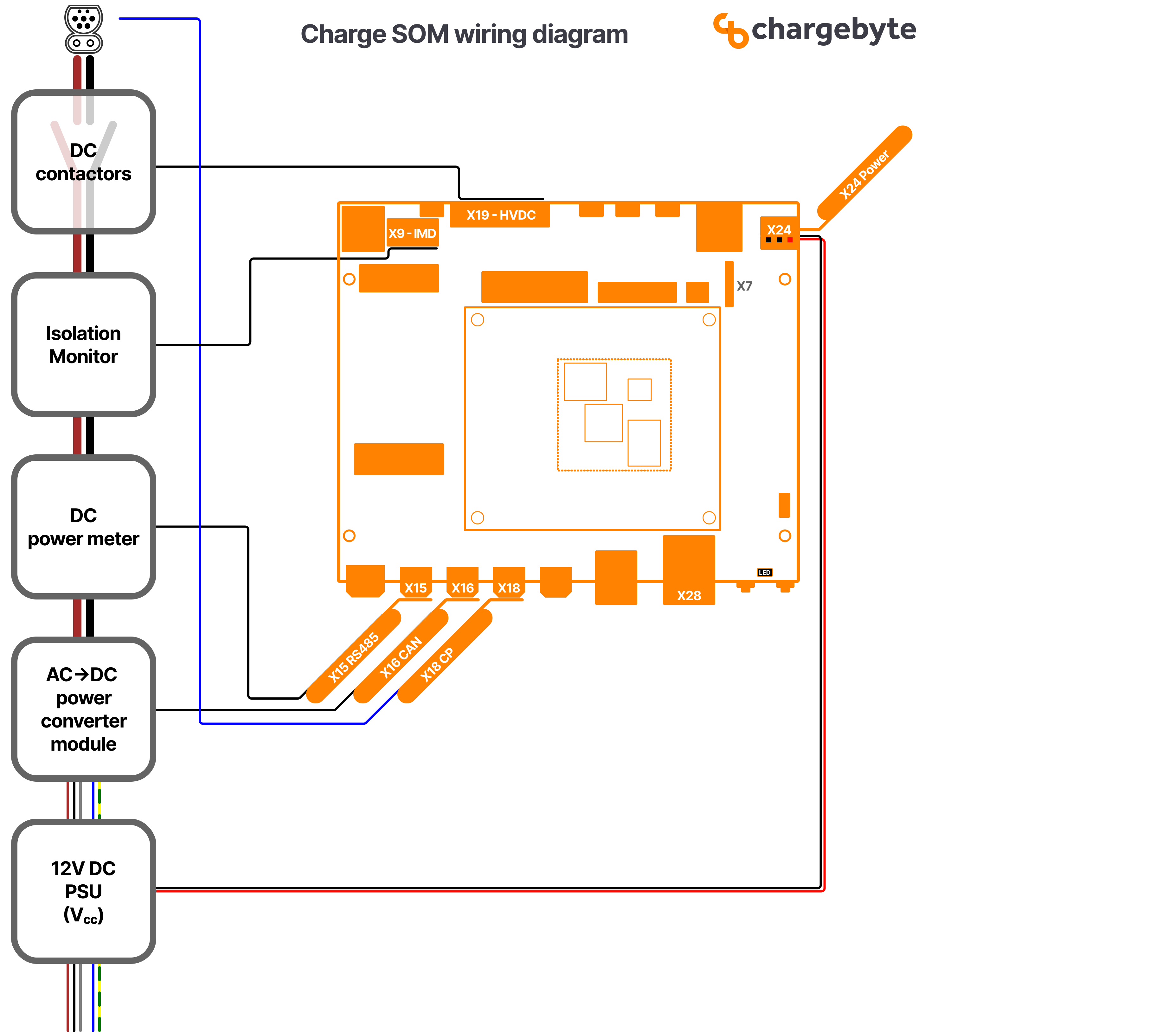
Fig. 6: Wiring Overview Diagram for Charge SOM EVB
This wiring diagram shows an overview of all components which are required at minimum to build a DC charging station:
A PSU as 12V DC supply for the Charge SOM EVB
A controllable power module (rectifier) for converting AC grid power into DC power to the EV. In this example, this power module is connected via CAN interface to the Charge SOM EVB which is a typical interface type for such devices.
A DC power meter for measuring the transferred energy. In this example, this electricity meter is connected via RS-485 bus and it is assumed that the meter supports the Modbus protocol. However, there exists also meters which use Ethernet and other protocols.
An insulation monitoring device (IMD). In the drawing, only the safety related connection is shown, that means that the output pin of the IMD (which switches on insulation faults) is wired to an input pin of the Charge SOM. The state of this input pin is observed by the onboard safety controller of the Charge SOM which ensures a safe state of the whole system in case of emergencies.
The high-voltage DC contactors for DC plus and minus rails.
Control Pilot / Proximity Pilot (X18)
For ISO 15118 / DIN 70121 compliant communication between EVSE and PEV, Charge SOM supports
CP (control pilot) signaling including Green PHY communication.
This Green PHY communication is available on network interface eth1. The MAC address of
this host interface is stored within the EEPROM on the Charge SOM.
The PP (proximity pilot) monitoring from EVSE side is currently not implemented for DC setups yet. So please leave this pin unconnected.
High-Voltage Connector (HVDC, X19)
The X19 connector provides signals to switch the high-voltage contactors, but also for the corresponding feedback signals to detect contactor welding.

Fig. 7: Recommended Contactor Wiring
Note
The precharge contactor might not be necessary in your setup.
Ethernet (X28)
The X28 socket supports 10/100 Mbit/s Ethernet. In the Linux operating system it
is available as network interface eth0. This interface is part of a bridge
interface br0. The MAC address of this interface is stored within the OTP
of the System on Chip.
EIA-485 Interfaces (X13, X15)
In order to connect the Charge SOM to an internal peripheral (e.g. smart meters, display and RFID readers), the board supports up to two EIA-485 interfaces.
Board Interface |
X13 |
X15 |
Linux Interface |
/dev/ttyLP4 |
/dev/ttyLP3 |
Termination |
yes, 120 Ohm permanently activated |
yes, 120 Ohm permanently activated |
Local Echo |
no |
no |
CAN (X16)
The CAN-FD interface is connected to X16, which is a full implementation of the CAN FD protocol
specification version 2.0B. It is available on Linux network interface can0, which has a
default bitrate of 1 Mbit/s.
CAN Configuration
In order to change the default CAN bitrate of can0 interface, please adapt BitRate value and
run the following commands:
mkdir /etc/systemd/network/can0.network.d
cat <<EOF > /etc/systemd/network/can0.network.d/bitrate.conf
[CAN]
BitRate=125000
EOF

networkctl reload
networkctl reconfigure can0
systemctl restart everest
The change takes effect immediately, but also persists across reboots and firmware updates.
Insulation Monitoring Device (IMD, X9 + X15)
The X9 connector and its pinout is designed to match the signals used by Bender’s ISOMETER® isoCHA425HV with AGH420-1/AGH421-1.
In addition to the direct electrical wiring, the device has to be connected via RS-485 bus to provide the insulation resistance values which are required by EVerest’s IMD interface.

Fig. 8: Wiring for Bender’s IMD to Charge SOM EVB
Expansion (X11)
The i.MX93 expansion header provides access to several hardware interfaces which are not used by the evaluation board by default. These pins are routed directly to the NXP i.MX93, so several functions can be used on them. The following graphic attempts to visualize the possible multiplexing options. However, it only considers common ones, not all possible ones, to maintain clarity.
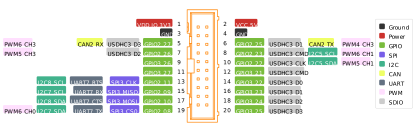
Fig. 9: Pin Mux Options for the Signals of Expansion Connector (X11)
The following table summarizes the same common interfaces and list the available DT overlays. These overlays make the interfaces configuration very easy. But the actual possible combinations still depend on the pinmuxing of these 16 pins!
Interface |
Maximum possible |
Available DT Overlay |
Notes |
|---|---|---|---|
SPI |
1 |
||
I²C |
3 |
|
|
UART [1] |
1 |
|
without RTS/CTS |
SDIO |
1 |
||
CAN [2] |
1 |
||
PWM |
6 |
||
GPIO |
16 |
|
Warning: short clock after power-up/reset |
The following table indicates all possible muxing options for these signals. By default, the factory shipped configuration for the Charge SOM EVB is that the signals GPIO3_26 and GPIO3_27 are configured as GPIO via imx93-charge-som-clko-gpio.dtso . All other pins are left untouched by default.
X11 Pin Number |
Signal |
Linux GPIO Line Name |
Pad Mux Options |
Notes |
|---|---|---|---|---|
5 |
CAN2_RX |
X11_CAN2_RX |
|
|
6 |
CAN2_TX |
X11_CAN2_TX |
|
|
7 |
PWM5_3 |
X11_PWM5_3 |
|
|
8 |
GPIO_IO23/I2C5_SCL |
X11_I2C5_SCL |
|
|
9 |
GPIO3_26 |
X11_GPIO3_26 |
|
Warning: clock output after power-up/reset |
10 |
SD3_CLK/I2C5_SDA |
X11_I2C5_SDA |
|
|
11 |
GPIO3_27 |
X11_GPIO3_27 |
|
Warning: clock output after power-up/reset |
12 |
SD3_CMD |
X11_SD3_CMD |
|
|
13 |
SPI_EXT_CLK |
X11_SPI_EXT_CLK |
|
|
14 |
SD3_D0 |
X11_SD3_D0 |
|
|
15 |
SPI_EXT_MISO/LPUART7_RX |
X11_SPI_EXT_MISO |
|
|
16 |
SD3_D1 |
X11_SD3_D1 |
|
|
17 |
SPI_EXT_MOSI |
X11_SPI_EXT_MOSI |
|
|
18 |
SD3_D2 |
X11_SD3_D2 |
|
|
19 |
SPI_EXT_CS0/LPUART7_TX |
X11_SPI_EXT_CS0 |
|
|
20 |
SD3_D3 |
X11_SD3_D3 |
|
I²C Interfaces
The i.MX93 on the Charge SOM provides several I²C interfaces:
Hardware |
Linux |
Usage |
Clock frequency |
|---|---|---|---|
I2C1 |
i2c-0 [3] |
on Single Channel DC Carrier Board: RTC (0x52) |
400 kHz |
I2C2 |
i2c-1 |
on Charge SOM: Vertexcom MSE102x (0x4a, 0x72) |
400 kHz |
I2C3 |
i2c-2 |
on Charge SOM: PMIC (0x25) + EEPROM (0x50, 0x58) |
400 kHz |
I2C5 |
disabled |
disabled |
|
I2C7 |
disabled |
disabled |
|
I2C8 |
disabled |
disabled |
In to use the other I²C interfaces configure the matching DT overlays in the bootloader.
RTC
The Single Channel DC Carrier Board is equipped with a super cap buffered RTC.
This RTC is available via Linux device /dev/rtc0. By default, the EVerest
firmware tries to synchronize the RTC via NTP and ensures that
Backup Switch-Over Mode is configured correctly.
In case the Single Channel DC Carrier Board doesn’t have NTP access, the RTC must be configured manually:
timedatectl set-ntp false
timedatectl set-time "YYYY-MM-DD hh:mm:ss"
hwclock --param-set bsm=0x2
TPM
The Charge SOM includes a TPM 2.0 compliant chip.
This TPM is available via Linux device /dev/tpm0.